



If your company runs on SAP, someone in IT or finance will eventually ask why legal needs its own contract tool. SAP Ariba Contracts and SAP S/4HANA both handle contracts, so it’s a fair question. This guide shows you how to decide which contracts belong in SAP, which belong in a dedicated CLM, and how to make the two work together.
The short answer depends on 2 things: who drafts the contract, and what has to happen after signature.
What you need to know
- SAP Ariba Contracts is a procurement tool. SAP names the strategic buyer as its primary user.
- SAP S/4HANA for enterprise contract management covers legal documents, but it lives inside the ERP and follows its configuration cycle.
- A dedicated CLM covers every contract type, from NDAs and customer MSAs to intercompany agreements, with drafting, review and obligation tracking built for legal.
- You rarely have to pick one. Many SAP-heavy companies keep purchasing data in SAP and run legal contracting in a CLM connected by API.
- Decide by contract type and owner, never by which vendor you already pay.
What SAP contract management covers
SAP contract management is the set of contract capabilities inside the SAP ecosystem. In practice, that means 2 products: SAP Ariba Contracts for procurement contracts, and SAP S/4HANA for Enterprise Contract Management (ECM) for legal documents managed inside the ERP.
SAP’s older Contract Lifecycle Management product has been retired. SAP now positions SAP Ariba Contracts as its replacement for procurement contracts.
SAP Ariba Contracts
SAP Ariba Contracts sits in SAP’s source-to-pay suite. It handles authoring, clause workflows and compliance for supplier agreements. In SAP’s own comparison of its contract products, the primary business case is procurement transformation and the primary persona is the strategic buyer.
That’s a strong fit if your problem is spend leakage on supplier contracts. It’s a weak fit if your problem is the flow of NDAs, distribution agreements and customer MSAs landing on legal’s desk every week.
SAP S/4HANA for enterprise contract management
ECM is SAP’s answer for legal departments. SAP describes it as a single repository for buy-side contracts, sell-side contracts and other legal documents such as NDAs, policies and patents, with legal counsel, contract managers and CFOs as the main users.
Because ECM is part of S/4HANA, it shares the ERP’s data model, release cycle and implementation partners. Before you commit, ask one blunt question: how many partner days will each new contract type, template or approval rule cost you?
Where SAP contract management falls short for legal teams
ERP systems are built around transactions. Legal work is built around language: clauses, fallback positions, redlines and obligations that outlive the purchase order.
That gap shows up at expensive moments:
- Quarter end, third-party paper: Sales sends you a customer’s 40-page MSA on a Thursday. Where does your playbook live, and who redlines it before Monday?
- Due diligence: An acquirer asks for every contract with a change-of-control clause across your group entities. Can you answer in an afternoon, or does it take a week of email?
- Silent renewals: A software licence or office lease signed outside procurement can renew automatically. If no purchase order exists, the ERP may not flag it.
- Business users who bypass the system: HR, marketing and IT may have no reason to log into a procurement suite. They may email legal instead, leaving the contract outside the repository.
Analysts see the same split. Gartner’s Hype Cycle for Legal, 2026 advises buyers to look at strategic sourcing suites for buy-side contract management, at CLM tools connected to CRM for sell-side contracting, and at CLM integrated with enterprise legal management when the legal department is the priority. The same report notes that many solutions claiming enterprise-wide coverage lack the integrations needed to become a true source of truth.
So SAP can be the right answer for procurement and still the wrong answer for legal.
Stop chasing contracts that never reach your ERP
See how legal teams run every contract type in one place
SAP Ariba contract management vs a dedicated CLM at a glance
The table below reflects typical positioning. Check the details against your SAP release, licences and partner scope.
| Criterion | SAP Ariba Contracts | SAP S/4HANA ECM | Dedicated CLM |
|---|---|---|---|
| Primary user | Strategic buyer | Legal counsel, contract manager, CFO | Legal team plus every business requester |
| Contract types | Buy-side procurement contracts | Buy-side, sell-side and legal documents | All types, including NDAs, intercompany, HR and real estate |
| Drafting and negotiation | Clause workflows tied to sourcing | Templates inside the SAP interface | Templates, clause libraries, redlining in Word, playbook-based review |
| Link to purchasing data | Native to source-to-pay | Native to S/4HANA | Through an API or connector, which needs design |
| Change effort | SAP project, usually partner-led | SAP configuration, usually partner-led | Configured by legal ops with the vendor, outside the ERP release cycle |
| Best fit | Procurement-led companies with high supplier contract volume | SAP-standardised companies ready to configure for legal | Legal-led contracting across functions, entities and countries |
How to decide between SAP and a dedicated CLM in 5 steps
Use these 5 steps to make the decision on evidence rather than on vendor relationships:
- Map your contracts by type and owner.
- Find where contracts stall today.
- Decide which data must live in SAP.
- Test both options on your own contracts.
- Price the full cost, including adoption.
1. Map your contracts by type and owner
Pull a sample from the last 12 months and sort it into buy-side, sell-side, corporate and intercompany. Then note who drafted each one and who negotiated it.
If procurement owns most of the volume and uses your templates, SAP Ariba Contracts may be enough. If legal negotiates a large share on third-party paper, you need tooling built for that work.
2. Find where contracts stall today
Ask your team where contracts sit longest: intake, legal review, approvals or signature. Talk to sales and procurement too, because they feel the delay first.
This step matters most for the business case. A contract stuck in legal review can delay revenue recognition, customer onboarding or procurement, and that is the kind of business impact your CFO will want to understand.
3. Decide which data must live in SAP
Split the system of record deliberately. SAP should keep what drives transactions: vendor master data, outline agreements, prices, volumes and payment terms.
A CLM should keep what drives legal risk: negotiated language, clause deviations, approval history, obligations and renewal dates. The integration question then becomes precise. Which fields have to flow into SAP, in which direction, and how often?
4. Test both options on your own contracts
Gartner recommends requesting proofs of concept before full implementation. Run the same 3 documents through each option: a customer’s MSA on their paper, a standard NDA and an intercompany services agreement.
Time each one from intake to signature. Then ask a business user with no training to request a contract. Their reaction will tell you more than any demo.
5. Price the full cost, including adoption
Licences are the visible part. Add partner days for configuration, change requests every time legal updates a template, contract migration and user training.
Gartner also advises buyers to establish how vendors will migrate existing contracts, since labour and time for migration are easy to underestimate. Then weigh the cost of the alternative: contracts that never enter any system because the tool was too heavy for occasional users.
How to run a dedicated CLM alongside SAP
For many SAP companies, the answer is both. Procurement keeps sourcing and purchasing in SAP. Legal runs drafting, negotiation, signature and post-signature follow-up in a CLM. An API can help keep the shared data synchronized.
A typical setup looks like this:
- SAP to CLM: vendor and customer master data, so legal never retypes a counterparty.
- CLM to SAP: contract value, start and end dates, payment terms and a link to the signed document.
- CLM only: redlines, clause deviations, approvals, obligations and renewal alerts.
The result is a single place to answer contract questions, without asking SAP to become a legal drafting tool.
What this looks like with DiliTrust Contract Management
The pain usually starts with third-party paper. With DiliTrust Contract Management, your team reviews incoming contracts in Microsoft Word with Risk Detector, which checks each clause against the playbook that legal has defined and flags deviations by risk level.
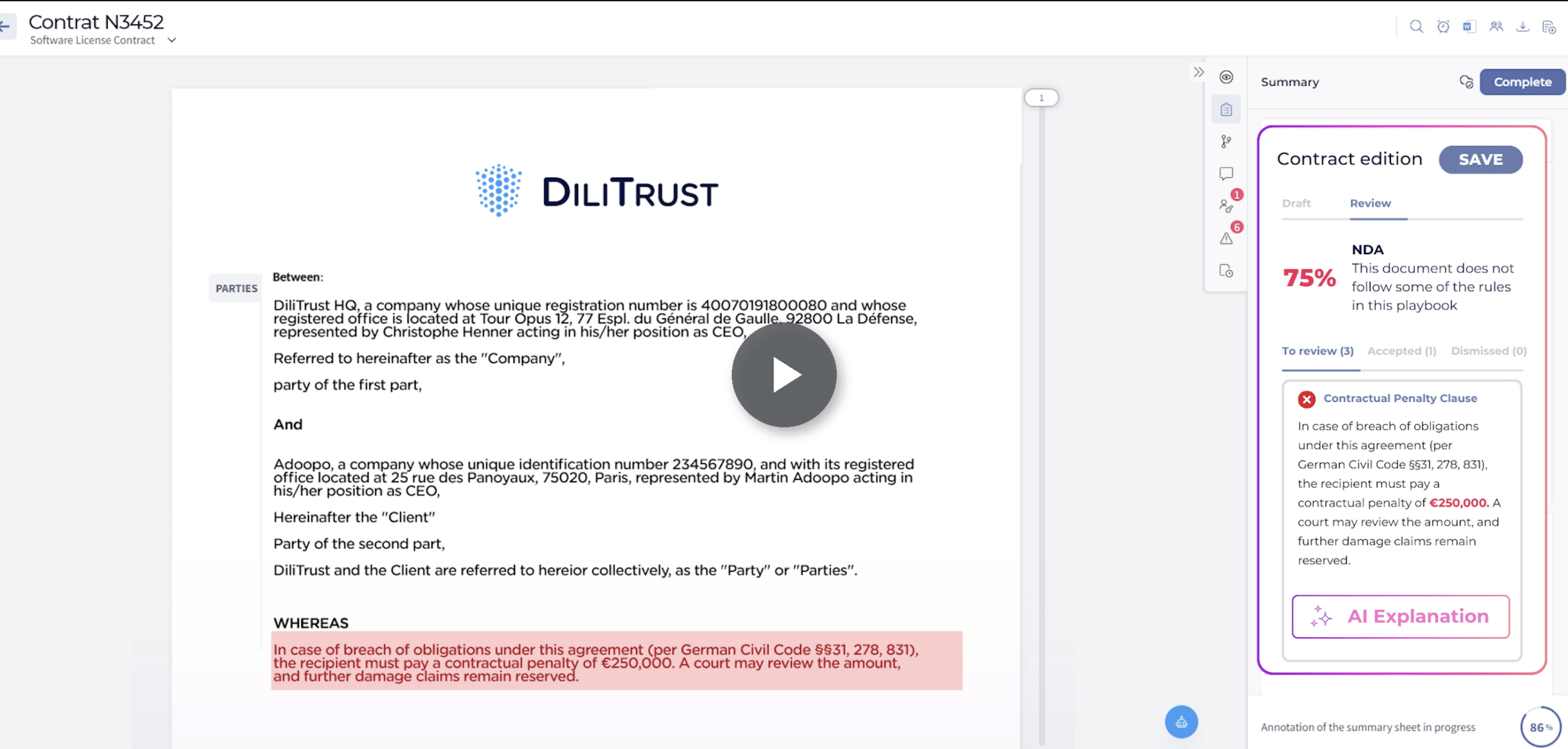
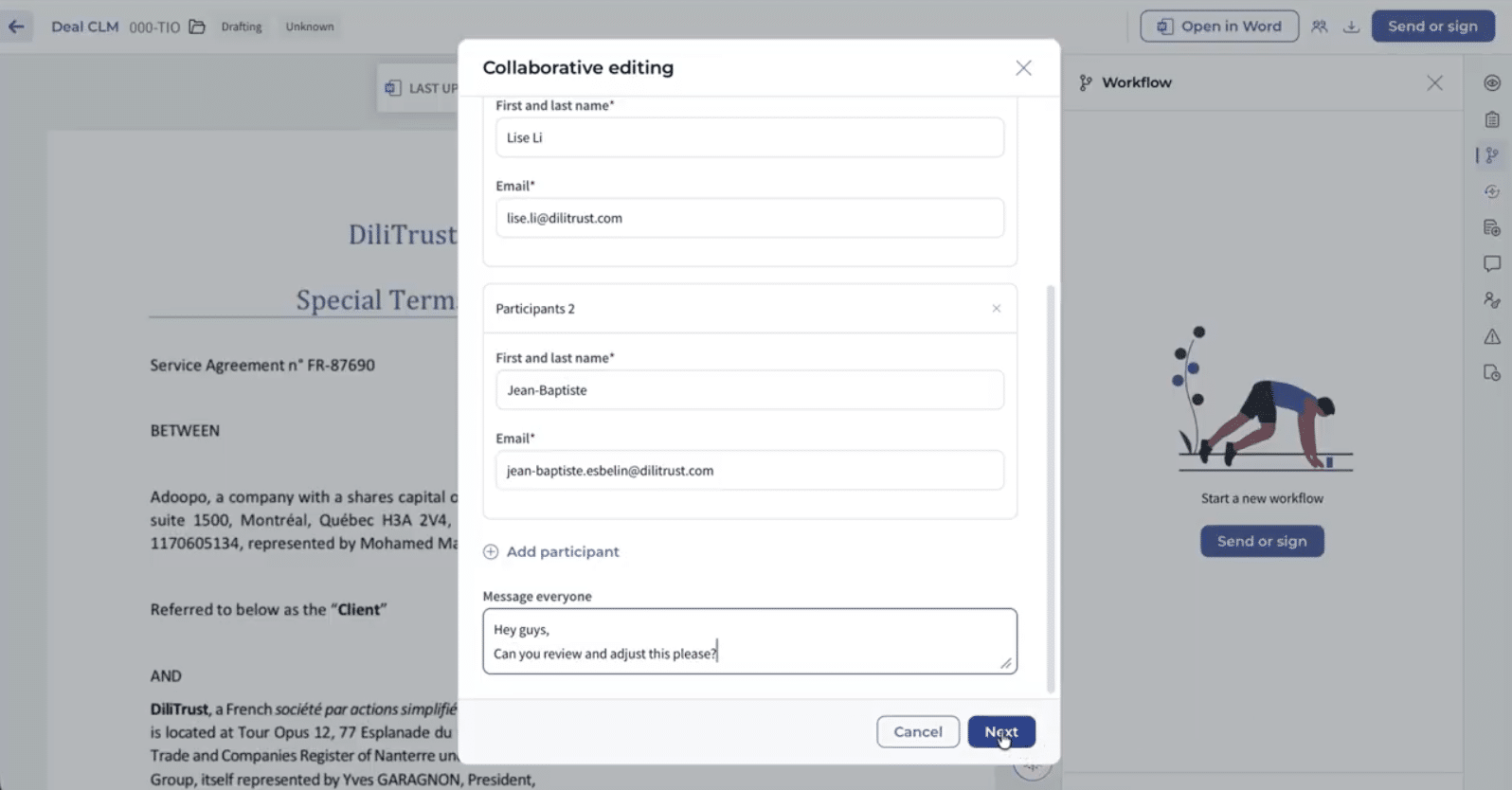
Several reviewers can now edit or comment on the same document in Word at the same time, rather than working one after another. Approvers can validate contracts from their phones, and documents can be sent for signature through e-signature providers such as DocuSign, Adobe Sign or Yousign.
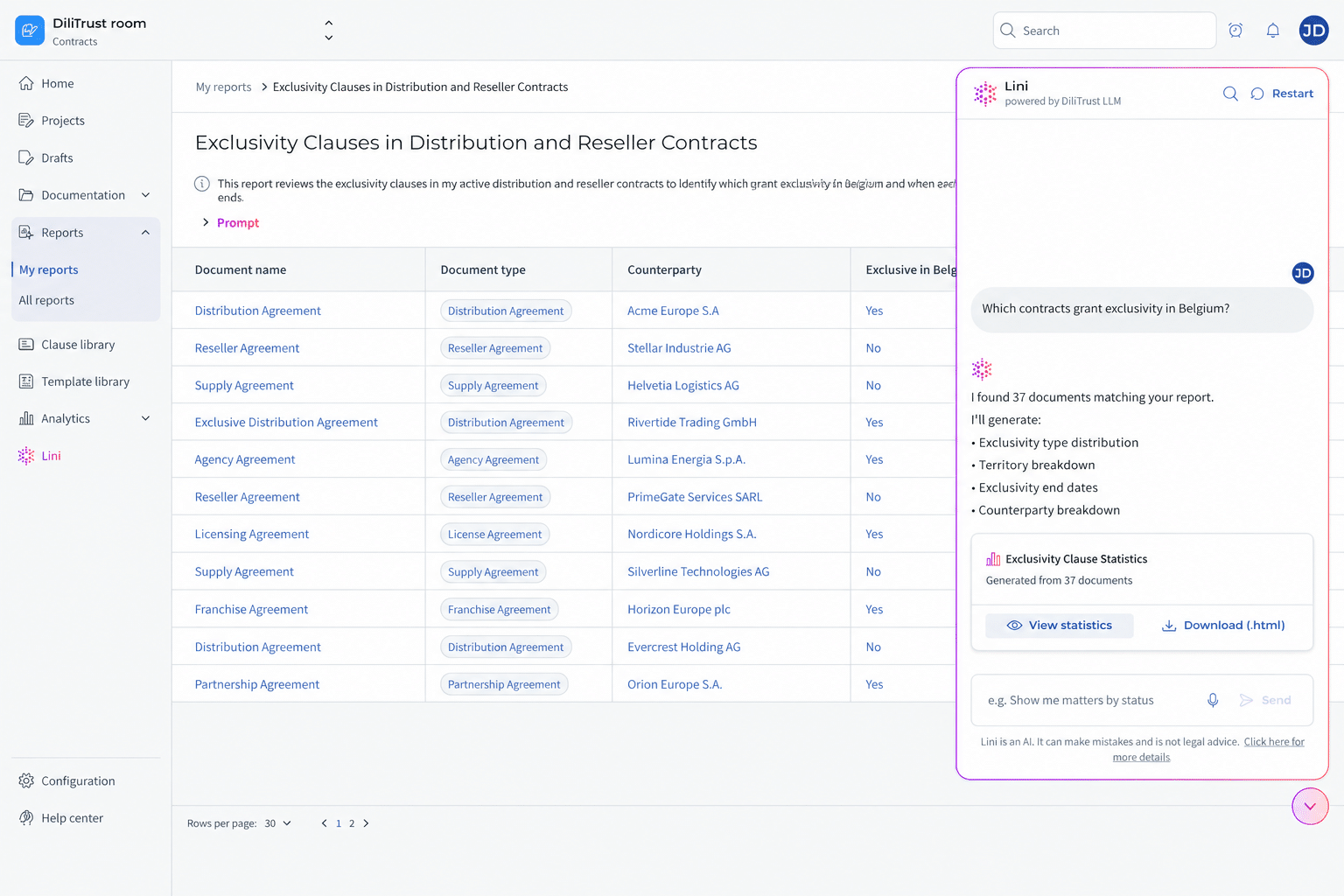
After signature, renewal alerts, including for contracts that renew tacitly, keep notice periods visible. Smart Reports turn contract searches into dashboards you can present to a CFO or audit committee.
On the SAP side, DiliTrust CLM can connect to SAP through an API integration or custom solution. DiliTrust CLM also connects with Salesforce, HubSpot and Microsoft Dynamics 365. Within the DiliTrust platform, Entity Management can provide company data used in contracts.
What does that change in practice? An educational publisher operating across Spain and Latin America cut contract signature time from one month to under 48 hours in some regions after introducing e-signatures with DiliTrust CLM, with contracts flowing directly from its Microsoft Dynamics CRM. A global pharmaceutical company onboarded 700 users to DiliTrust CLM in 9 months, with contracts organised by geography and business unit.
DiliTrust holds ISO 27001 and ISO 27701 certifications and has a SOC 2 report.
Frequently asked questions
Does SAP have a contract management module?
Yes. SAP offers SAP Ariba Contracts for procurement contracts and SAP S/4HANA for Enterprise Contract Management for legal documents managed inside the ERP. SAP’s older Contract Lifecycle Management product has been retired.
Can SAP S/4HANA replace a contract lifecycle management tool?
SAP S/4HANA can replace a dedicated CLM for companies that are fully standardised on SAP and ready to configure it for legal use cases. Teams that negotiate many contracts on third-party paper or need occasional business users to request contracts easily often find a dedicated CLM faster to adapt and adopt.
What are the limitations of SAP Ariba for contract management?
SAP Ariba Contracts is designed for buy-side procurement, with the strategic buyer as primary user. Sell-side agreements, NDAs, intercompany contracts and legal playbook review usually sit outside its core scope.
When should a company use a dedicated CLM instead of SAP?
Choose a dedicated CLM when legal drafts or negotiates a large share of contracts, when contracts span sales, HR, real estate and corporate matters, or when business users outside procurement need to request and track contracts themselves. Keep SAP for the purchasing data those contracts generate.
Can a dedicated CLM integrate with SAP?
Yes. A dedicated CLM can typically integrate with SAP through an API or connector. DiliTrust Contract Management includes a REST API, which can exchange counterparty data and contract metadata with SAP through a custom integration. Confirm the fields and sync frequency during your proof of concept.
What contract management software do legal teams use in SAP environments?
One setup is to run a dedicated CLM for drafting, negotiation, signature and obligation tracking, connected to SAP for purchasing and financial data. DiliTrust Contract Management covers that legal side and connects to the rest of the DiliTrust platform, including Entity Management and Matter Management.
Conclusion: decide by contract, not by vendor
SAP Ariba Contracts does its job well for procurement. The mistake is asking it to do legal’s job too. Map your contracts, find where they stall, split the data deliberately and test both options on real documents.
If the evidence shows legal owns the bottleneck, give legal a tool built for legal work and connect it to SAP. To compare options in more depth, use our full CLM evaluation framework, and when you need leadership sign-off, here’s how to build the business case for a dedicated CLM.
Get contracts signed sooner without replacing SAP