


Most legal departments are drowning in contract chaos. Missed renewal deadlines. Version control nightmares. Approval bottlenecks that delay deals by weeks. The manual spreadsheet-and-email approach to managing contracts costs companies up to 9% of annual revenue through leakage, non-compliance, and wasted time.
CLM software puts an end to that.
This guide cuts through the noise. You’ll understand what CLM software actually does, which features matter, how AI is reshaping contract management, and what to look for when evaluating vendors.
CLM Meaning
CLM stands for Contract Lifecycle Management. The acronym refers to the end-to-end process of managing a contract from the moment a request is raised through drafting, negotiation, execution, and eventual renewal or termination.
You’ll see “CLM” used interchangeably to describe both the discipline (the practice of managing contracts systematically) and the software category (platforms built to automate that process). In practice, when someone asks “what does CLM mean?”, they’re almost always asking about the software.
What Is CLM Software?
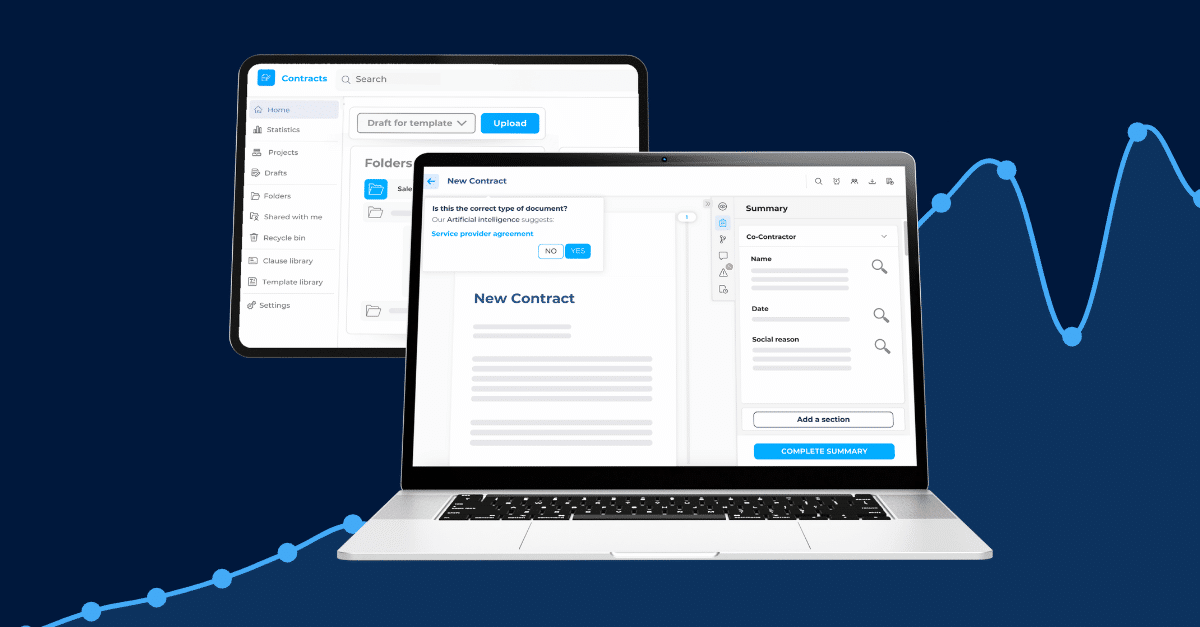
CLM software is a platform that automates and manages the entire contract lifecycle from creation and negotiation through execution, performance monitoring, and renewal within a single, centralized system. It replaces manual, fragmented processes, helping legal and business teams reduce risk, ensure compliance, and accelerate deal cycles.
The term “lifecycle” is not marketing fluff. It signals a fundamental shift from storing signed PDFs to actively managing contracts as strategic business assets across every stage.
CLM vs. Basic Contract Management Software
Basic contract management tools function as digital filing cabinets. They store signed documents, offer search functionality, and send deadline alerts. That’s useful but incomplete.
CLM software goes further. It handles pre-signature workflows (authoring, redlining, approvals), post-signature tracking (obligations, renewals, compliance), and everything in between. You manage the full journey of a contract, not just the end state.
If your current system can’t guide a contract from initial request to final termination, you don’t have CLM.
Why “Contract Lifecycle” Is the Key Distinction
The lifecycle model addresses a critical reality: contracts create obligations, risks, and revenue opportunities long after signature. A three-year SaaS agreement signed today will trigger renewal decisions, price adjustments, usage reviews, and compliance audits over 36 months.
CLM platforms ensure nothing falls through the cracks. Automated alerts surface upcoming renewals. Obligation tracking assigns accountability. AI-powered analytics reveal which vendors consistently miss SLAs or which contract terms drive the most disputes.
Basic storage tools can’t deliver that. CLM can.
Why CLM Software Matters in 2026
Legal departments face rising contract volumes, leaner teams, and stakeholders who expect instant answers about contractual commitments. Manual processes don’t scale.
Contract mismanagement bleeds value in ways most organizations underestimate:
- Missed renewals: Auto-renewals trigger without renegotiation, locking in unfavorable terms for another cycle.
- Version chaos: Sales, legal, and procurement work from different drafts. The wrong version gets signed.
- Approval delays: Contracts sit in email inboxes for days while legal hunts down the right stakeholder.
- Compliance blind spots: Without centralized visibility, legal can’t confirm whether suppliers meet GDPR, SOC 2, or ESG requirements.
- Wasted negotiation leverage: Teams renegotiate the same unfavorable clauses repeatedly because there’s no institutional memory.
Studies show that poor contract management costs companies up to 9% of annual revenue. For a $500M organization, that’s $45M annually.
How Modern CLM Transforms Legal Operations
CLM software delivers measurable impact:
- Faster contract processing by automating template assembly, approval routing, and clause deviation checks.
- Reduction in manual tasks through AI-powered data extraction and workflow automation.
- Full audit trails that document every change, approval, and signature for compliance reporting.
- Real-time visibility into contract status, obligations, and risk exposure via centralized dashboards.
- Proactive deadline management with automated alerts for renewals, expirations, and key milestones.
The shift from reactive (hunting for contracts) to proactive (managing obligations before they become problems) fundamentally changes how legal teams operate.
The 9 Stages of the Contract Lifecycle
Effective CLM spans every phase. Understanding the full journey helps you identify where your current process breaks down.
Stage 1 – Contract Request & Template Authoring
Stakeholders outside legal (sales, procurement, HR) need contracts. Without a formal intake process, requests arrive via email, Slack, or hallway conversations.
CLM software centralizes intake. Business users fill out structured request forms. The system routes requests to the right queue based on contract type, value, or risk. Legal stays in control without becoming a bottleneck.
Template authoring ensures consistency. Legal teams build clause libraries with pre-approved language. Templates auto-populate based on deal parameters, reducing drafting time from hours to minutes.
Stage 2 – Contract Creation & Drafting
Once approved, contracts move to drafting. Modern CLM platforms integrate with Microsoft Word and Google Docs, enabling teams to work in familiar environments.
Automated document assembly pulls data from CRM systems (customer name, pricing, service tiers) and combines it with template clauses. The platform applies conditional logic: if the deal is above $500K, insert executive approval requirements; if the customer is in the EU, include GDPR-compliant data processing terms.
Stage 3 – Negotiation & Redlining
Negotiations happen in real time. Both parties redline the draft, propose alternatives, and track changes.
CLM platforms maintain version control. Every edit is logged. Legal teams can instantly see what changed between Version 3 and Version 7 without manually comparing documents.
Collaboration features enable internal teams (legal, finance, operations) to comment, suggest edits, and approve changes without switching tools.
Stage 4 – Internal Review
Before sending a contract to the counterparty, internal stakeholders must review and validate terms. Finance confirms pricing. IT verifies data security clauses. Compliance checks regulatory alignment.
CLM software automates review workflows. The system routes drafts to the right reviewers based on contract type and value. Reviewers receive alerts, provide input, and approve or request changes within the platform.
Stage 5 – Approval Workflows
Contracts require formal approvals before execution. Approval paths vary by deal size, risk level, or contract type.
CLM platforms enforce delegation of authority policies. A $10K vendor contract may only need legal approval, while a $2M customer agreement requires CFO and General Counsel sign-off.
Automated escalation prevents delays. If an approver doesn’t respond within 48 hours, the system escalates to their manager or triggers a reminder.
Stage 6 – Execution & eSignature
Once approved, contracts move to signature. Modern CLM platforms have their own Signature solution, or integrate with leading eSignature providers (DocuSign, Adobe Sign, Yousign, HelloSign).
Legal teams send contracts directly from the CLM system. The platform tracks signature status in real time. Once fully executed, the signed contract auto-files in the repository with metadata tags (party names, dates, contract type) already applied.
Legal validity is ensured through audit trails that document every step: who sent the contract, when it was opened, who signed, and timestamp verification.
Stage 7 – Storage & Repository Management
Signed contracts move into a centralized, searchable repository. Unlike shared drives or email archives, CLM repositories structure contracts with metadata: counterparty, value, term length, renewal date, governing law.
Powerful search capabilities enable legal teams to instantly locate contracts by any field. “Show me all supplier agreements expiring in Q3 2026 with auto-renewal clauses” returns results in seconds.
Granular access controls ensure only authorized users can view sensitive contracts. Role-based permissions prevent unauthorized edits or deletions.
Stage 8 – Performance Monitoring & Compliance
Execution is not the finish line. Contracts create ongoing obligations: payment schedules, SLA commitments, compliance audits, reporting requirements.
CLM platforms extract obligations automatically using AI. The system assigns tasks to responsible owners, tracks completion, and flags missed deadlines.
Performance dashboards provide real-time visibility. Legal teams monitor vendor compliance, spending against budget, and contract utilization rates.
Stage 9 – Renewal or Expiry Management
Contracts expire or auto-renew. Without proactive management, organizations miss renegotiation windows or get locked into unfavorable terms.
CLM software sends automated reminders 90, 60, and 30 days before renewal. Legal teams review pricing, performance, and business need. Renegotiations begin early, leveraging data from the contract’s performance history.
At termination, the platform archives the contract and maintains a full audit trail for regulatory or legal purposes.
Key Features to Look for in CLM Software
Not all CLM platforms deliver the same capabilities. Prioritize based on your organization’s maturity and pain points.
Core Features (Must-Haves)
These features form the foundation of any credible CLM solution:
| Feature | What It Does |
| Template & Clause Libraries | Pre-approved contract templates and reusable clause language that legal teams control and business users can access |
| Workflow Automation | Automated routing, approvals, and task assignments based on contract type, value, or risk |
| Version Control | Track every change, maintain a full history, and instantly compare versions |
| Central Repository | Searchable, metadata-rich storage with role-based access controls |
| eSignature | Integration Native or third-party integration with DocuSign, Adobe Sign, or other providers |
| Deadline & Obligation | Tracking Automated alerts for renewals, expirations, payment milestones, and compliance deadlines |
| Audit Trails | Complete documentation of every action (edits, approvals, signatures) for compliance and legal defensibility |
| Search & Reporting | Multi-criteria search, custom reports, and dashboards for visibility into contract portfolio |
Advanced Features
Organizations with higher CLM maturity should evaluate these capabilities:
Security & Compliance Requirements
Contract data is sensitive. Your CLM platform must meet enterprise security standards:
Who Uses CLM Software?
CLM software serves multiple departments, not just legal. Cross-functional adoption drives ROI.
Legal Teams: Centralize contract creation, negotiation, and compliance tracking. Reduce time spent on low-value tasks like searching for contracts or manually tracking renewals.
Sales Teams: Accelerate deal cycles with self-service contract generation from approved templates. Sales reps create NDAs, MSAs, and order forms without waiting for legal review.
Procurement Teams: Manage supplier contracts, track spending against negotiated rates, and monitor vendor compliance with SLAs and regulatory requirements.
Finance Teams: Ensure payment terms are met, track revenue commitments, and support financial audits with full contract visibility.
HR Teams: Manage employment agreements, NDAs, and contractor agreements with automated workflows and secure storage.
Compliance & Risk Teams: Monitor contractual obligations, flag high-risk clauses, and generate compliance reports for internal and external audits.
The Role of AI in CLM Software
AI is no longer a differentiator. It’s table stakes. But not all AI implementations are created equal.
AI-Powered Contract Review & Risk Analysis
AI scans incoming third-party contracts, identifies risky clauses (unlimited liability, one-sided indemnification, unfavorable termination rights), and flags them for legal review.
Advanced systems compare proposed language against your playbook standards and suggest approved alternatives. This turns contract review from a manual, line-by-line process into an automated triage: AI handles standard clauses, legal focuses on exceptions.
Automated Data Extraction & OCR
Manually extracting contract metadata (party names, effective dates, renewal terms, payment schedules) is time-consuming and error-prone.
AI-powered OCR reads contracts in any format (scanned PDFs, images, Word docs), extracts structured data, and auto-populates metadata fields. Legacy contract migration that once took months now completes in days.
Clause Generation & Deviation Detection
Generative AI drafts contract clauses based on deal parameters and legal requirements. Instead of copy-pasting from old agreements, legal teams prompt the AI: “Generate a limitation of liability clause for a $500K SaaS agreement governed by New York law.”
Deviation detection compares incoming contracts to your clause library. The system calculates match percentages, highlights differences, and recommends whether to accept, negotiate, or reject proposed language.
Proprietary vs. Third-Party AI – Why Data Security Matters
This distinction matters more than most buyers realize.
Many CLM vendors integrate third-party AI from OpenAI, Google, or Microsoft. That means your contract data your pricing, customer names, confidential terms gets sent to external platforms for processing. You’re trusting a third party with your most sensitive business information.
Proprietary AI, trained and hosted by the CLM vendor on their own infrastructure, keeps your data in-house. No external dependencies. No exposure to third-party AI providers. Full control over data sovereignty.
For organizations in regulated industries (financial services, healthcare, government), proprietary AI is non-negotiable. Even for commercial enterprises, data security should drive vendor evaluation.
Ask every CLM vendor: “Where does my contract data go when your AI processes it?”
How to Choose the Right CLM Solution
Buying CLM software is a multi-stakeholder decision. Use a structured framework to evaluate vendors and avoid costly missteps.
- Buying CLM software is a multi-stakeholder decision; use a structured framework to avoid costly missteps.
- Identify pain points across legal, sales, procurement, and finance; rank by business impact.
- Define must-haves (templates, workflow automation, repository, eSignature, renewal alerts) vs. nice-to-haves (AI review, CRM integration, advanced analytics).
- Evaluate vendors via RFP covering functionality, AI/automation, integrations, security certifications, and support.
- Run a proof of concept with 2-3 vendors using real contracts; involve actual end users, not just leadership.
- Plan for change management: secure an executive sponsor, train users by role, migrate contracts in phases, and monitor adoption post-launch.
Vuoi approfondire?
Consulta il nostro framework di implementazione CLM
Scopri come rendere fluida l’implementazione del tuo CLM in questa guida passo passo.

CLM Software Pricing — What to Expect
CLM pricing varies widely based on user count, feature set, and deployment model.
Typical Pricing Models:
- Per-User/Per-Month: $50–$300 per user per month, depending on feature tier. Common for mid-market solutions.
- Annual Subscription: $10,000–$50,000 per year for small teams; $100,000+ for enterprise deployments.
- Tiered Pricing: Vendors offer Basic, Professional, and Enterprise tiers with increasing feature access.
Factors Driving Cost:
- Number of users (full vs. read-only licenses)
- Advanced AI features (contract review, risk scoring)
- Integrations (CRM, ERP, eSignature)
- Support level (24/7, dedicated account manager)
- Professional services (implementation, training, custom workflows)
Hidden Costs to Watch:
- Migration fees for importing legacy contracts
- Overage charges if you exceed contracted user or document limits
- Custom workflow development if no-code tools are limited
Request transparent, all-in pricing during vendor evaluation. Compare total cost of ownership over 3 years, not just Year 1.
DiliTrust for Contract Lifecycle Management
At DiliTrust, we built our CLM module to address exactly the challenges outlined in this guide. From drafting and negotiation through execution and renewal tracking, our platform gives legal and business teams a single place to manage the full contract lifecycle.
Our AI is developed in-house, meaning your contract data stays fully under your control, with no exposure to third-party providers. For organizations operating across multiple jurisdictions, we support multilingual contracts and offer local server deployment to meet regional compliance requirements.
As one Corporate Legal Counsel put it: “It is a tailor-made tool that fits into a high-end legal/digital expertise and helps us transition from manual to automatic mode, facilitating the management of our daily work.”
If you’re evaluating CLM software, you can explore how DiliTrust fits your needs: Book a demo today.
Discover your savings
Get a realistic ROI based on industry standards when you partner with DiliTrust on CLM.