




Contract management in Excel or SharePoint can work. Plenty of legal teams run their portfolio from a tracker or a document library, and the setup is fine as long as it’s built with discipline and you know where it stops.
This guide shows you how to set up each tool properly, which warning signs mean you’ve outgrown them, and how to move to a dedicated platform without losing data along the way.
At a glance
- Excel works as a contract register for a small portfolio with a single owner. It has no built-in alerts or contract-level approval record.
- SharePoint contract management adds storage, permissions and version history. Renewals, approvals and reporting still depend on Power Automate flows that someone has to build and maintain.
- The cost shows up at renewal and audit time, long after the day you set the tool up.
- Six signals tell you it’s time to move, from missed notice periods to business teams waiting on legal for routine contracts.
- A clean migration starts with an inventory and a data model. Software comes after.
Can you manage contracts in Excel or SharePoint?
Yes, up to a point. Excel can serve as a contract register and SharePoint as a contract repository with metadata and permissions. Neither tool provides a complete contract lifecycle workflow out of the box: renewal alerts, approval routing, clause standards and contract-level audit evidence need configuration or manual work.
Here’s how the three options compare on the things that matter when a contract goes wrong.
| Capability | Excel tracker | SharePoint library | Dedicated CLM |
|---|---|---|---|
| Contract storage | Links or file paths only | Central library with folders and metadata | Central repository with structured contract data |
| Data entry | Typed by hand | Typed by hand, or AI models with extra document processing licenses | AI extracts key data, a person confirms it |
| Renewal alerts | None built in | Power Automate flows you build and maintain | Rule-based alerts by contract type and notice period |
| Approvals | Power Automate approval flows | Configurable validation, negotiation and signature workflows | |
| Audit trail | File version history, if stored in OneDrive or SharePoint | File-level activity logs | Contract-level log of who viewed, validated, signed or downloaded |
| Clause standards | None | Template library | Templates, clause library and playbook-based review |
| Portfolio reporting | Manual filters and pivot tables | Custom views or Power BI | Built-in reports and dashboards |
| Cost | Already licensed | Already licensed, plus build and upkeep time | Subscription |
How to set up an Excel contract tracker that holds up
If one person owns the contract portfolio and it fits on a single screen, a well-built spreadsheet is a reasonable start. The difference between a useful tracker and a liability is structure.
The columns your contract tracker needs
Use one row per contract and one column per data point. Don’t merge cells, and don’t hide dates inside free-text notes.
| Column | Why it matters |
|---|---|
| Contract ID | A unique reference that stops duplicates |
| Counterparty | The legal entity name, not the trading name |
| Contracting entity | Which of your entities signed (essential in a group) |
| Contract type | NDA, MSA, supplier, customer, lease |
| Business owner | The person accountable after signature |
| Effective date | When obligations start |
| Expiry date | When the term ends |
| Auto-renewal | Yes or no |
| Notice period | In days |
| Notice deadline | A formula: expiry date minus notice period |
| Value and currency | For spend and exposure questions |
| Status | Draft, in negotiation, active, expired, terminated |
| Link to signed PDF | One source file, not a copy in someone’s inbox |
| Last reviewed | Date and initials |
Rules that keep the spreadsheet honest
- One owner edits. Everyone else reads.
- Use drop-down lists for type and status, so “Supplier”, “supplier” and “Vendor” don’t turn into three categories.
- Calculate the notice deadline with a formula, then use conditional formatting to turn it red 90 days out.
- Store the file in SharePoint or OneDrive so there’s one version, never as an email attachment.
- Review it on a fixed date every month with the business owners.
Then accept the limit. Conditional formatting turns a cell red, but a tracker alone doesn’t send an email. If nobody opens the file before the deadline, the notice window can close unnoticed.
How to set up SharePoint contract management in 5 steps
SharePoint is the natural next step if you already run Microsoft 365. This setup is one a legal team can maintain without turning it into an IT project.
- Create a dedicated document library for contracts. Keep it separate from general team files. Organize it by contracting entity or contract type, not by year.
- Add metadata columns. Mirror the Excel columns above: counterparty, contract type, owner, expiry date, notice period, auto-renewal, value and status. Make the date and status columns required.
- Set permissions at library or folder level. Restrict HR, M&A and other sensitive contracts, and keep the list of editors short.
- Build views for the questions you get asked. “Expiring in the next 120 days.” “Auto-renewing this quarter.” “Active contracts by entity.” Views are what turn a folder into a register.
- Add reminders with Power Automate. A scheduled flow can check notice deadlines and email the owner. Write down who built it, which account it runs under, and test it after every change to the library.
What about Microsoft’s Contracts Management site template?
Microsoft offers a Contracts Management team site template built on document processing for Microsoft 365. It comes with pre-built pages for contract requests, templates and service agreements, plus sample models that extract metadata from documents.
There are two caveats. You need per-user or pay-as-you-go document processing licenses to apply it. And it gives you a starting site, so approvals, alerts and reporting are still yours to configure.
Where Excel and SharePoint break down
Both setups work on the day you build them. The problems show up later, at the moments when a contract costs money or credibility.
World Commerce & Contracting estimates that poor contract management erodes almost 9% of annual revenue on average, and that contract-related data is scattered across 24 different systems in the average organization (WorldCC, 2025). Spreadsheets and shared libraries are often part of that sprawl.
Renewals depend on someone remembering
A supplier contract rolls over for another three years because the notice deadline passed during the owner’s vacation. The reminder flow? It ran under the account of a colleague who left last spring.
Disciplined contract renewal management starts with alerts that don’t depend on one person’s calendar or one person’s login.
Approvals happen in email
Sales sends a customer MSA with a raised liability cap. Legal approves it in a reply-all. Six months later, nobody can find which version was approved, or by whom.
A basic SharePoint library stores the final PDF, but approval decisions need to be captured separately in configured metadata or workflows.
The audit trail stops at the file
An auditor or a buyer’s due diligence team asks for every active contract with a change-of-control clause. Can you answer this week?
SharePoint and Microsoft Purview can log who opened or edited a file.
They don’t, by themselves, provide structured contract data across 2,000 PDFs unless document processing is configured or someone captures the data in columns.
Nobody can answer portfolio questions
“How much do we spend with this supplier across all our entities?” “Which contracts still reference the old data processing terms?” In Excel or SharePoint, each question becomes a manual project.
So legal turns into the bottleneck for questions the business should be able to answer on its own. And while sales waits on legal for a routine NDA, the deal waits too.
See how legal teams track every deadline
Signs you’ve outgrown your Excel or SharePoint setup
Contract count matters less than complexity. Check how many of these apply to you:
- You’ve missed a notice period, or caught one with less than a week to spare.
- Approvals for nonstandard terms live in email threads.
- Answering an audit or due diligence request takes days of manual searching.
- You manage contracts for several entities or jurisdictions.
- Sales or procurement wait on legal for routine contracts like NDAs.
- One person built the tracker or the flows, and nobody else understands them.
If two or more apply, treat them as a signal to assess the hidden cost of your current setup.
What a dedicated contract management platform changes
A contract lifecycle management (CLM) platform moves the work that Excel and SharePoint leave to people into the system itself. The clearest way to judge it is moment by moment.
| Moment | With Excel or SharePoint | With a dedicated CLM |
|---|---|---|
| A signed contract arrives | Someone types counterparty, dates and value into columns | AI extracts key data into a summary sheet, and a lawyer confirms it |
| A notice deadline approaches | A reminder fires only if the flow still works | Alerts are calculated from the notice period, sent to a team and repeated until marked done |
| Sales needs an NDA | A request to legal, then a wait | The business starts from an approved template, and legal can focus its review on deviations |
| A nonstandard clause needs sign-off | Approval in a reply-all | A validation workflow records who approved what, and when |
| An auditor asks a question | Days of searching | Search contract data with a log of key actions |
In practice, you can answer a renewal question in the meeting where it’s asked. Before, you’d promise to come back next week.
How DiliTrust Contract Management handles it
DiliTrust Contract Management (CLM) is the contract module of the DiliTrust Suite. For teams leaving spreadsheets and SharePoint behind, these are the parts that matter most:
- Central repository: Upload existing contracts into a folder structure that mirrors your entities or business units. Access rights are set by folder, team and role.
- AI extraction: Uploaded contracts can receive a summary sheet with key attributes and clauses, filled in by AI and confirmed by your team.
- Automatic alarms: Set rules by contract type, for example notifying a team 90 and 30 days before the expiry of configured auto-renewing contracts
- Workflows: Validation, negotiation and signature steps, with e-signature through providers such as DocuSign, Adobe Sign or Yousign. Approvers can also validate contracts from a phone.
- Templates and Clause Library: Draft in the platform, or in Microsoft Word through the add-in.
- Smart Reports: Ask a question about your portfolio in plain language and get a results table you can turn into charts.
- Activity log: See who opened, validated, signed or downloaded a contract, and when.
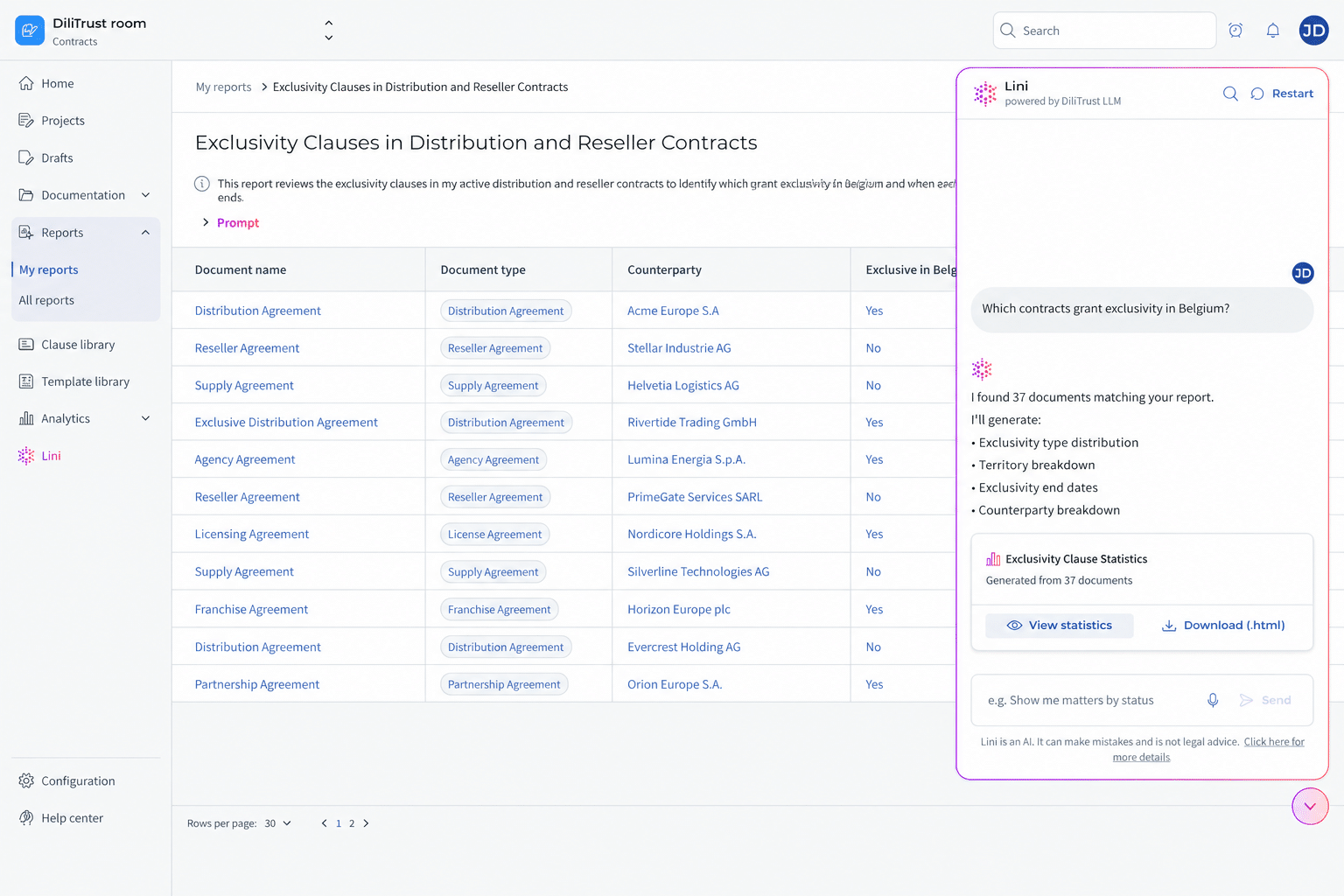
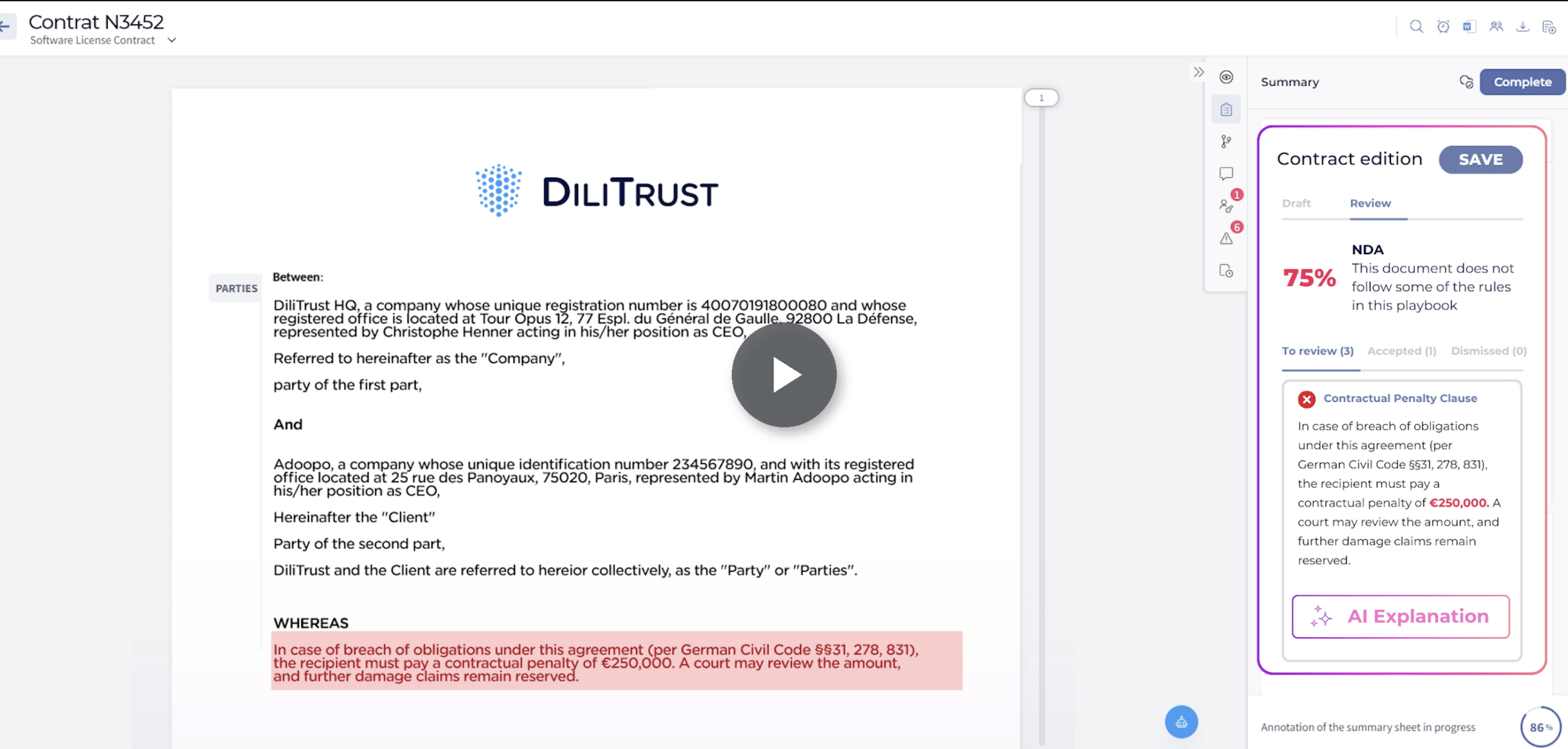
If third-party paper is your bottleneck, Risk Detector reviews incoming contracts against your playbook and suggests tracked changes in Word. It requires the DiliTrust AI add-on.
The results show up where the business feels them. A pharmaceutical group had no central repository, and its teams worked across inconsistent contract versions. After a global rollout to 700 users in 9 months, its teams now work from a single compliant contract standard. A global education publisher reduced contract signature time from 1 month to less than 48 hours in some regions.
What are missed renewals and slow approvals costing you?
Get a realistic ROI based on industry standards when you partner with DiliTrust on CLM.
How to move from Excel or SharePoint to a CLM without losing data
Migration pain usually comes from moving a mess into a new tool. Do these steps in order.
- Inventory every source. Spreadsheets, SharePoint libraries, shared drives, inboxes, the filing cabinet in the regional office. List them all before you move anything.
- Define your data model. Agree on contract types, required fields and naming before you upload. Your Excel column list is a good first draft.
- Clean up as you go. Separate expired contracts, merge duplicates, and match each contract to its contracting entity.
- Start with active, high-risk contracts. Auto-renewing supplier agreements and customer MSAs go first. The archive can follow.
- Check the extracted data. AI extraction speeds up the load, but a person should confirm dates and notice periods on the contracts that carry real exposure.
- Retire the old tracker on a fixed date. Running Excel and the CLM in parallel for months creates two versions of the truth. If finance still wants a spreadsheet, export it from the CLM instead of maintaining one by hand.
Your contract repository is only as reliable as the data model behind it, so steps 2 and 3 deserve more time than the upload itself.
Frequently asked questions
Can SharePoint be used for contract management?
Yes, as a repository. A SharePoint library with metadata columns, permissions and views can store and organize contracts. Renewal alerts and approvals need Power Automate flows, and clause standards or portfolio reporting need extra tools, so it suits small portfolios with simple approval paths.
How do I track contract renewals in Excel?
Add columns for expiry date, notice period and auto-renewal, then calculate the notice deadline with a formula. Use conditional formatting to highlight deadlines 90 days out and review the sheet on a fixed schedule. A basic Excel tracker won’t send reminders, so a fixed review schedule remains necessary.
What’s the difference between SharePoint and contract management software?
SharePoint stores files and whatever data you type about them. A CLM platform can extract data from contracts, track dates, route them for approval and signature, and record lifecycle events. The gap becomes visible at renewal and audit time.
Does Microsoft 365 have a built-in contract management tool?
Microsoft offers a Contracts Management site template for SharePoint, which requires document processing licenses. It provides pages, lists and sample AI models for extracting metadata. Lifecycle workflows, alerts and reporting still need configuration or custom builds.
When should a legal team switch from SharePoint to a CLM?
Switch when a missed notice period, an audit request or a backlog of routine contracts starts costing time or money. Groups with several entities, and teams whose business users wait on legal for standard contracts, usually feel it first.
What software do legal teams use to replace contract spreadsheets?
Legal teams that outgrow contract spreadsheets often evaluate a contract lifecycle management (CLM) platform. DiliTrust Contract Management, for example, combines a central repository, AI data extraction, rule-based renewal alarms and approval workflows in one place.
Can I keep using Excel after moving to a CLM?
Yes, as an output rather than the source. In DiliTrust Contract Management, you can export summary sheets and search results to Excel for reporting, while the contracts and their data stay in one place.
Conclusion: match the tool to the risk
Excel and SharePoint are reasonable starting points for contract management. Set them up with the columns, views and review cadence above, and they’ll hold for a small portfolio with one clear owner.
Then ask yourself one thing. If a notice deadline passed tomorrow, would anyone know in time? If the honest answer depends on one person or one Power Automate flow, your contracts have outgrown the tools you’re keeping them in.