


Your CFO asks why legal needs two more headcount. You know the team is underwater. But the evidence sits across 4 inboxes, a Teams channel, two shared drives and a running list in someone’s notebook. You can’t put a number on the table.
That gap is what a legal intake process closes, and the clock is running. Gartner predicts that by 2029, 60% of legal departments will use AI-driven intake systems that capture every request. Teams that haven’t defined their process by then will end up automating chaos.
Here’s how to build one that your business units will actually use, and where automation genuinely helps.
Key takeaways
- Legal intake is the structured channel through which internal business teams submit legal requests, and the triage logic that decides what happens next.
- In-house legal intake is a different problem from law firm client intake. One manages internal demand, the other converts prospects.
- Start with process design, not software. Gartner names process definition and change management as the two obstacles that sink most intake projects.
- The data captured at intake is what lets a General Counsel justify headcount, prove value and spot bottlenecks before they become escalations.
- Intake only pays off when it connects to matter management. A request that lands in a form and dies there has just moved the inbox.
What is legal intake?
Legal intake is the structured process by which an in-house legal team receives, captures and triages requests for legal work from business units across the organization. It replaces ad hoc emails and hallway conversations with a standard submission channel, so every request arrives with the information needed to assign it, prioritize it and track it to completion.
Gartner defines intake and triage as a core component of any legal operating model: the means by which corporate legal teams receive, assign, execute and manage legal work. Gartner rates its benefit as transformational, with market penetration at 20% to 50% of the target audience.
Legal intake vs. law firm client intake
Search for “legal intake” and most of what you’ll find is about law firms converting prospective clients. That’s a sales problem. Yours isn’t.
| Law firm client intake | In-house legal intake | |
|---|---|---|
| Who submits | Prospective clients | Internal business teams |
| Goal | Convert a lead, run a conflict check | Route work, control demand, capture data |
| Volume driver | Marketing spend | Business activity across the company |
| Success metric | Conversion rate | Cycle time, workload visibility, resource allocation |
| Downstream system | Practice management, billing | Matter management, contract management |
Everything below assumes the right-hand column.
Why most legal teams skip it
Gartner’s research is blunt about the reason: the business case for intake is often viewed as soft, and moving from an unstructured approach to a systematic one requires behavior change that legal teams find daunting. Budget approval is easier for contract automation, where the saving is visible.
So intake gets deferred. Meanwhile the department has no record of what it was asked to do, by whom, or how long it took.
Why email is failing as your legal front door
A shared legal inbox feels like a system. It isn’t. It’s a queue with no owner, no status and no memory.
The cost shows up in three places. Requests arrive incomplete, so your team spends the first 48 hours asking for the contract, the counterparty name and the deadline. Urgent work gets buried under routine questions because nothing is prioritized. And when a request stalls, nobody outside legal can see where it is, so the business escalates to the GC.
That last one is expensive. Only 18% of legal departments report being able to provide support for high-velocity business decisions, per Gartner’s 2023 Legal Department Digitalization Survey. If sales can’t tell whether their NDA is in review or lost, they stop asking and start signing without you.
4 signs your intake process needs rebuilding
- You can’t say how many requests legal received last quarter, or what type they were.
- The same three questions get asked back on every contract request.
- Business teams route work by picking the lawyer they know personally.
- Work arrives through at least four channels and no one owns reconciling them.
If you recognized three of these, the problem is the front door, not the team behind it.
Before you buy anything, map your demand. Pull the last 90 days of requests from your shared inbox and categorize them. Most teams find that a handful of request types make up the bulk of their volume. That’s your build list.
How to build a legal intake process in 6 steps
The sequence matters more than the tooling. Gartner’s own recommendation is to start with process definition, document current workflows and identify pain points before evaluating vendors. Here’s how that plays out in practice.
Step 1. Map how work actually arrives today
Spend two weeks logging every request and where it came from. Email, Slack, Teams, verbal, ticketing systems, forwarded chains from procurement.
You’re looking for two things: the volume split by request type, and the people who act as informal routers. Both will shape the design.
Step 2. Define your request types and what each one needs
Pick the 4 to 6 highest-volume categories. NDA, commercial contract review, employment question, regulatory query, dispute notification, policy approval.
For each one, write down the minimum information a lawyer needs to start work without a follow-up email. That list becomes your form. Keep it short. Every field you add is a field a sales rep will abandon.
Step 3. Build dynamic intake forms, not one long form
A single form covering every request type will be long, irrelevant to most submitters and ignored. Conditional logic solves this: the requester picks a request type, and only the relevant fields appear.
Make the fields that block work mandatory. Counterparty name, contract value, requested date, business owner. If a field isn’t required to start, don’t make it required to submit.
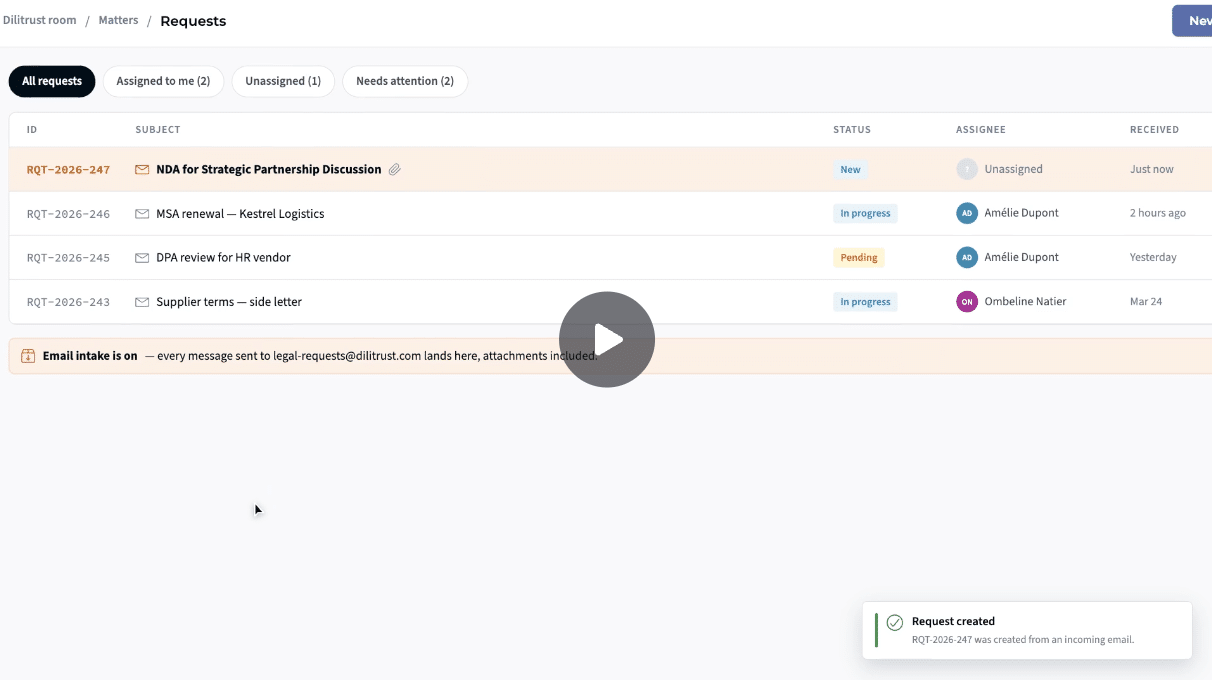
Forms aren’t the only way in. In DiliTrust Matter Management, a request emailed to a dedicated legal address lands in the same queue as form submissions, with a reference number, a status and an assignee.
Step 4. Write your triage rules before you automate them
Triage is a decision tree: who owns this request type, what priority does it carry, and what happens if the owner is unavailable.
Write it as a document first and run it manually for a month. You’ll discover the exceptions that would otherwise be hard-coded into a tool and fought about for a year. Only then is it worth configuring.
Step 5. Connect intake to matter management
This is the step teams get wrong. A request captured in a form and left there has achieved nothing except a better-looking inbox.
Each accepted request should become a tracked matter with an owner, a status, deadlines and a document trail. Each rejected or redirected one should be closed with a reason, because “not a legal request” is data you’ll want when you argue about scope later. The connection between intake and matter management is what turns a form into an operating model.
Step 6. Run the rollout as a change project
Gartner lists change management among the obstacles that most legal departments fail to address adequately, citing resistance from both legal and business users who want to keep working the way they always have.
Three things move adoption. Name a sponsor outside legal, ideally in sales or procurement, who tells their team to use it. Publish a response-time commitment and hold yourself to it, because speed is the only argument that beats habit. And stop answering requests that arrive by direct email, politely, with a link to the form. That last one is uncomfortable for about six weeks.
See what structured intake looks like in practice
DiliTrust Matter Management gives business teams one channel to reach legal, in-app or through a dedicated legal inbox, and turns each submission into a tracked matter with an owner and a deadline.
How to automate legal intake with AI, and where AI shouldn’t go
Automated legal intake is where the return compounds. It’s also where vendors overpromise, so be specific about what you’re buying.
What automation handles well
- Form logic: Conditional fields that adapt to the request type, with mandatory fields enforced at submission and at closure.
- Email capture: Requests sent to a dedicated legal address arrive as structured, traceable records rather than another thread. Submitters don’t need a login.
- Matter creation. Converting an accepted request into a full matter without re-keying anything.
- Status summaries: AI can draft a current-state update for a matter from the activity history, so the business gets an answer without interrupting the lawyer.
- Reporting: Volume by request type, by requesting department, time to close, workload per person.
Where AI should stay out, for now
AI that classifies and prioritizes incoming legal requests on its own is still an immature capability, and the consequences of getting it wrong are asymmetric. A misrouted employment complaint costs more than it saves.
Use AI to summarize, translate and draft status updates. Keep the decision about who owns a request, and how urgent it is, with a human until your triage rules have been stable for a year. Any vendor claiming fully automatic legal triage today should be asked for a named reference customer running it in production.
What to look for in legal intake software
| Capability | Why it matters | Question to ask the vendor |
|---|---|---|
| Configurable request types | Your categories, not a fixed template | Can an admin add a request type without professional services? |
| Conditional form fields | Short forms get completed | Can fields be mandatory at creation and at closure? |
| Email submission | Adoption without giving the whole company an account | Do submitters need an account? |
| Request to matter conversion | Stops intake becoming a dead end | Does the request data carry over to the matter? |
| Reporting by department | This is your resourcing argument | Can I break volume down by requesting business unit? |
| Connection to contracts | Most intake volume is contract work | Can a request be linked to the contract record? |
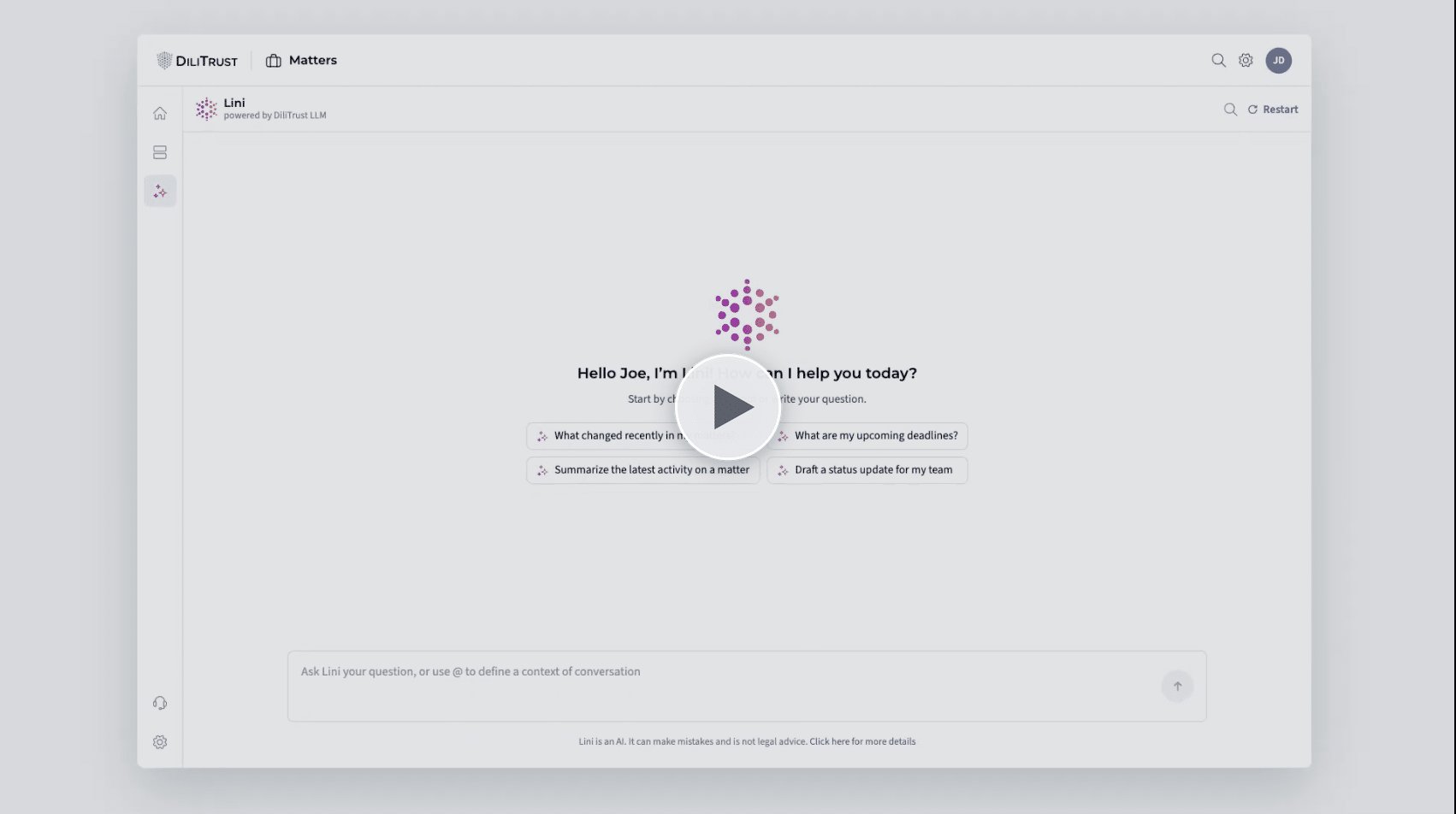
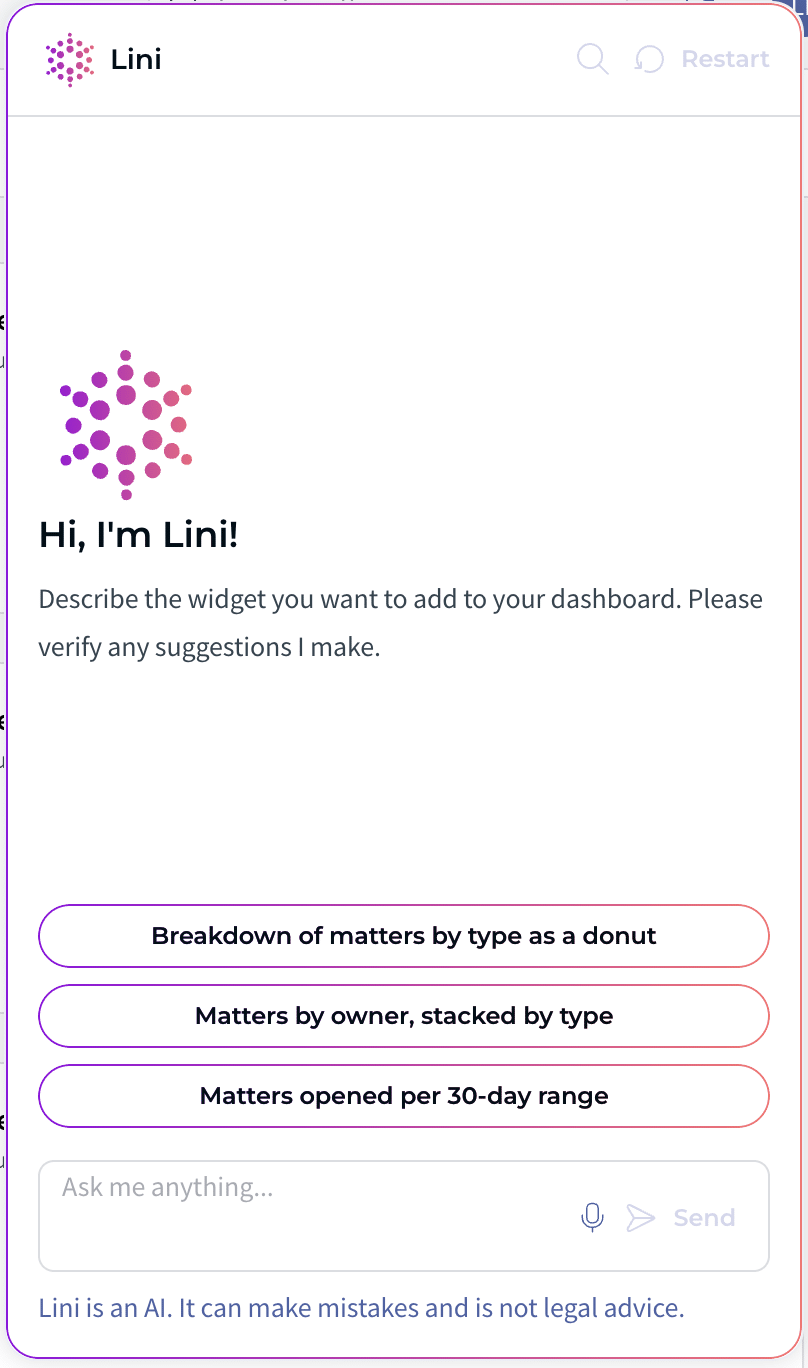
Here’s what that looks like day to day: Lini answers questions about your own matters, like what changed this week or which deadlines are coming up, and drafts the status update the business keeps asking for.
Legal intake KPIs: how to know it’s working
Gartner recommends establishing metrics aligned to clearly defined goals, such as improved cycle times or the share of in-house resources going to high versus low strategic value work. Pick four and report them monthly.
| KPI | What it tells you | Where it gets used |
|---|---|---|
| Requests received, by type | Where demand actually comes from | Resourcing and automation priorities |
| Requests received, by business unit | Which function consumes legal capacity | Chargeback conversations, service agreements |
| Average time to close, by request type | Whether the process is getting faster | Response-time commitments to the business |
| Ageing of open requests | What’s stuck, before it escalates | Weekly team stand-up |
| Workload distribution per lawyer | Who’s overloaded and who isn’t | Capacity planning, burnout prevention |
| Share of requests arriving through the official channel | Adoption, honestly measured | Change management follow-up |
That last metric is the one to watch in year one. If it isn’t climbing past 70%, your form is too long or your turnaround is too slow.
You don’t need a BI project to track these. In DiliTrust Matter Management, average time to close, matters by type, ageing and workload per person sit on one personal dashboard, and each user only sees the matters they have access to.
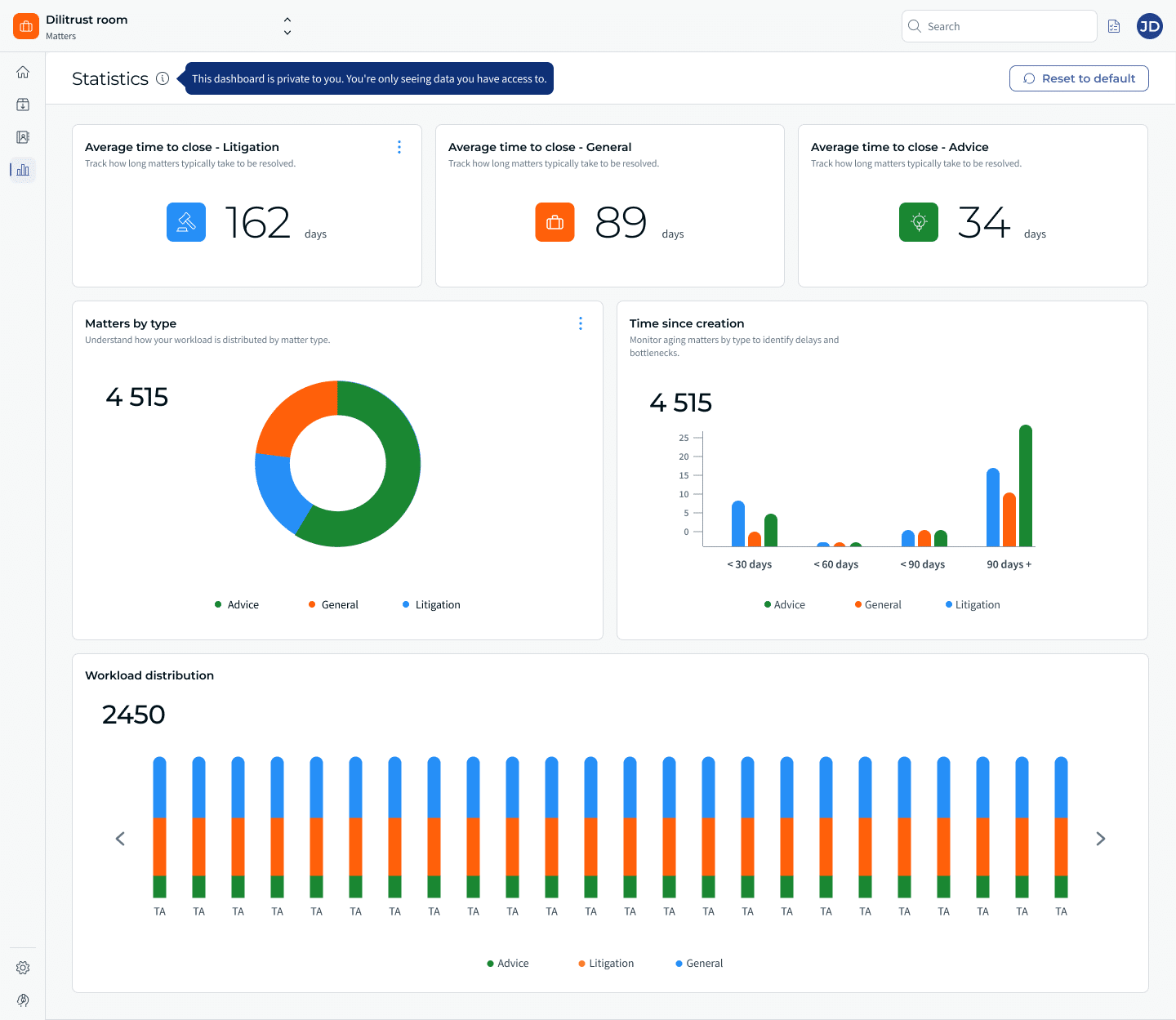
The “time since creation” view is the ageing KPI from the table above: anything sitting in the 90+ days bucket is a conversation for this week’s team meeting. And if the metric you need isn’t there yet, you can describe it to Lini in plain language and review the widget it suggests.
From intake data to a defensible business case
Here’s the part that justifies the project, and it isn’t time saved.
Legal demand keeps rising while teams stay flat. 83% of legal departments expect demand for legal services to increase, according to the CLOC 2025 State of the Industry Report, and budget constraints now rank as the top barrier reported by chief legal officers. You will not win that argument with an anecdote about being busy.
Intake data changes the conversation in three ways. It shows the business where its own requests go, which is usually enough to get procurement to stop sending you 40 NDAs a month that a template would handle. It lets you prove cycle times improved, which is what the commercial teams care about, because a contract that clears legal in 3 days instead of 11 is revenue recognized earlier. And it gives you a volume trend line to attach to a headcount request, replacing “we’re stretched” with a chart.
Gartner’s own list of business impacts for intake and triage includes speeding up legal advice and outcomes, such as faster sales cycle closures, and capturing data to demonstrate value, anticipate needs and identify bottlenecks.
This is also where intake stops being a legal ops project and becomes part of how the department operates. Legal operations teams that own intake tend to own the reporting that follows, and the credibility that comes with it.
DiliTrust Matter Management is built for exactly this chain. Business users submit requests in-app or by emailing a dedicated legal address, with no DiliTrust account required. Forms adapt to the request type with conditional, admin-configured fields. Your team assigns an owner, sets priority, and converts a request directly into a matter, with tasks, due dates and documents attached. Analytics then reports time to close by matter type, matter ageing and workload per person, while the Suite Cockpit breaks volume down by request type and by requesting department. Contract-related requests can be linked directly to the contract record, so intake data flows into the work rather than stopping at the door.
Frequently asked questions about legal intake
What does legal intake mean in a corporate legal department?
In a corporate legal department, legal intake is the structured way internal business teams submit work to legal, and the triage step that assigns, prioritizes and tracks it. It covers the submission channel, the information captured, the routing logic and the handoff into matter management.
How is in-house legal intake different from law firm client intake?
Law firm intake qualifies and converts prospective clients, with conflict checks and engagement letters. In-house intake manages internal demand from colleagues who are already “clients”. The goal is controlling workload and capturing data, not winning business.
What is a legal service request?
A legal service request, often shortened to LSR, is a single unit of work submitted to the in-house legal team by a business unit. Examples include an NDA review, an employment question or a regulatory filing. Structured LSRs are the raw material of legal department reporting.
Can you run legal intake without dedicated software?
Yes, and Gartner explicitly recommends starting there: a central mailbox, a single collaboration channel, or a shared form and spreadsheet. These fix real pain while you define the process. They stop working once volume, reporting needs or multiple request types outgrow manual tracking.
What should legal intake software do?
At minimum, it should offer configurable request types, conditional form fields, email submission for business users who don’t have an account, direct conversion of a request into a matter, and reporting broken down by request type and requesting department. Platforms such as DiliTrust Matter Management combine intake with matter tracking and analytics, so the data captured at submission is the same data you report on later.
Can AI automate legal intake end to end?
AI already takes a lot of manual work out of intake. It can summarize matters and documents, translate and answer questions in context. Automatically classifying and prioritizing incoming legal requests is still early-stage, and sensitive work routed to the wrong place is costly. Let AI handle the work around intake, and keep the triage decision with a person.
How long does it take to implement a legal intake process?
Process design typically takes 4 to 8 weeks, including demand mapping and triage rules. Configuration in a platform is faster. Adoption is the long pole: plan on two to three months of active change management before the official channel carries most of your volume.
Build the front door before you automate it
Legal intake isn’t a form. It’s the point where your department decides what work it does, who does it and how it gets measured.
Most teams start by shopping for software and end up automating a process nobody agreed on. Do the unglamorous part first: map the demand, name the request types, write the triage rules, then pick a tool that fits what you designed.
And once the data starts arriving, you’ll have something you’ve never had in front of the CFO: a number.
Turn every legal request into a number you can report
See how DiliTrust Matter Management connects legal intake, matters and reporting in one system.