


A vendor dispute surfaces 14 months into a project. The original Statement of Work is buried in someone’s inbox. The scope boundary was never written down. Legal is now spending two weeks reconstructing what was agreed: from memory, emails, and meeting notes.
When your team manages dozens of vendor engagements simultaneously, a Statement of Work is the document that prevents these situations. It sets out the deliverables, scope boundaries, timelines, roles, and change processes with enough precision that both parties have one source of truth when questions arise. And in active vendor relationships, questions always arise.
…
This guide walks you through the SOW process from end to end: what to include, how to structure it, and where enterprise teams most often get it wrong.
What Is a Statement of Work (SOW)?
A Statement of Work is a formal document that defines the specific work to be performed under a contract or Master Service Agreement. It captures the deliverables, scope boundaries, timeline, roles, acceptance criteria, and payment terms for a given engagement.
Think of it as the operational specification sitting alongside the legal framework. The contract establishes the relationship. The SOW defines each individual engagement within it.
SOW vs. Scope of Work
These two terms get used interchangeably, but they’re not the same thing. The scope of work is one section inside the SOW: the part that defines what’s included and excluded. The SOW is the full document.
SOW vs. Contract
A standalone contract governs the legal relationship: liabilities, warranties, dispute resolution, governing law. An SOW governs the work itself. In enterprise vendor arrangements, the two travel together. A Master Service Agreement sets the legal terms once, and each SOW defines a specific project under it.
SOW vs. Master Service Agreement (MSA)
The MSA is the umbrella agreement. It stays consistent across multiple engagements. The SOW changes with each project, is executed anew for each new scope of work, and references the MSA for legal terms. Together, they create a clean separation between legal governance and operational delivery.
The 3 Types of Statement of Work
Before drafting anything, choose the right SOW structure for the engagement. The type determines how deliverables are defined, how risk is allocated, and how disputes get resolved.
Design-detail SOW: Prescribes exactly how the work will be done: methods, materials, specifications. Common in manufacturing and construction. The vendor has little flexibility in how they deliver.
Level-of-effort SOW: Defines the time and resources required, not the output. Common for consulting arrangements where the deliverable is hours of expert time rather than a fixed product. Requires careful not-to-exceed (NTE) clauses to cap exposure.
Performance-based SOW: Focuses on outcomes: what the vendor must achieve, not how. Common in professional services and technology delivery. Acceptance criteria carry more weight here, since delivery quality is measured by results rather than method.
Enterprise legal teams often use performance-based SOWs for consulting and IT projects, and level-of-effort SOWs for managed services. Picking the wrong type creates contractual friction from day one.
10 Essential Components of an Effective SOW
A well-constructed SOW covers these ten elements. Miss any of them, and you’re handing the other party leverage in a dispute.
| Component | What it must include |
|---|---|
| Project overview and objectives | Purpose of the engagement and the business problem being solved |
| Scope of work | What is included and explicitly what is not |
| Deliverables | Specific outputs, not activities; name the file, the report, the system |
| Roles and responsibilities | Who does what on both sides: client and vendor |
| Timeline and milestones | Start date, end date, key checkpoints with specific dates |
| Acceptance criteria | How each deliverable is evaluated: who signs off and on what basis |
| Resource requirements | Named personnel, qualifications, substitution policies |
| Payment terms | Schedule, invoicing triggers, NTE clauses, late payment consequences |
| Assumptions and dependencies | What must be true for the vendor to deliver the work: system access, data, and decisions |
| Change management process | How scope changes are requested, priced, and formally approved |
The most overlooked element is the last one. A SOW without a formal change management process is a SOW waiting to become a dispute.
The SOW Process: 8 Steps from Draft to Delivery
Here is the standard SOW process for enterprise legal and procurement teams.
Step 1: Gather requirements from all stakeholders
Before a single word is drafted, legal and procurement need input from the business units requesting the work, IT (for technical dependencies), finance (for budget constraints), and any other internal team affected by the engagement. Stakeholder gaps at this stage become scope disputes later.
Step 2: Choose the right SOW type
Match the structure to the nature of the work. A fixed-price engagement may use a design-detail or performance-based SOW, depending on how the work and acceptance criteria are defined. A managed services arrangement needs level-of-effort with NTE protections. Getting this wrong creates confusion about what constitutes successful delivery.
Step 3: Draft from a standardized template
Your first SOW should not also be your blank canvas. Build from a pre-approved template that already embeds your organization’s standard language, risk positions, and clause structure. Every field in the template is a prompt: it ensures nothing gets missed under deadline pressure.
Step 4: Define scope boundaries in writing
The scope section must name both what is included and what is not. “Web application development” is not a scope definition. “Development of five specified modules, excluding third-party API integrations not listed in Appendix A” is. Ambiguity here is a common cause of scope creep, so the scope boundaries should be documented precisely.
Step 5: Route for internal review
The draft goes to legal for compliance and language approval, procurement for commercial terms, and the business owner for technical accuracy. These reviews should run in parallel rather than sequentially to reduce cycle time. For higher-value contracts, finance may need to validate the payment structure.
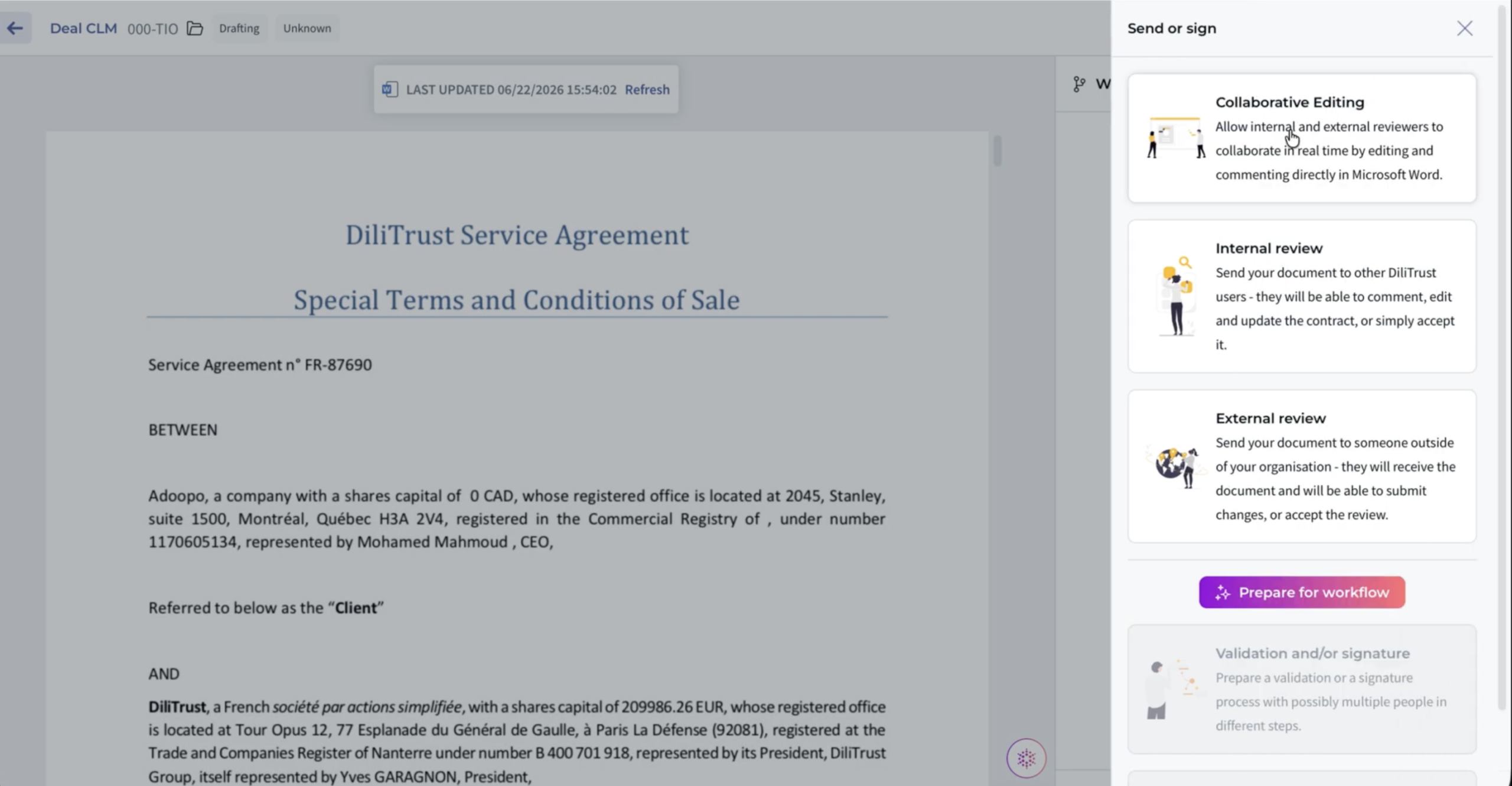
DiliTrust CLM lets you send to multiple reviewers simultaneously by allowing internal users to work in the platform and external parties to use a secure review link so legal, procurement, and the business owner can all work on the same draft at the same time, without sequential handoffs.
Step 6: Negotiate, revise, and finalize
Negotiation on SOWs typically focuses on scope boundaries, acceptance criteria, and payment triggers. Keep revision control tight: every version dated, tracked, and accessible. The final SOW must reflect what was actually agreed, not an accidental hybrid of earlier drafts.
Step 7: Obtain signatures
An executed SOW may be legally binding according to its terms and governing law, provided the required approvals are in place and the signatories have authority to bind their organizations. Confirm your delegation of authority matrix before routing for signature.
Step 8: Track obligations and manage changes post-signature
This is a common point of failure. The SOW gets signed, filed somewhere, and forgotten until a deliverable is missed or an invoice is disputed. Post-signature, every SOW needs active obligation management: milestone dates tracked, deliverable sign-offs documented, payment approvals triggered on time, and any change orders recorded with dual signatures.
Want to see what a standardized SOW process looks like?
DiliTrust CLM gives legal and procurement teams pre-approved templates, a synchronized clause library, and configurable approval workflows for every vendor engagement. No more drafting from scratch or chasing sign-offs by email.
SOW Best Practices for Enterprise Legal Teams
Generic project management advice doesn’t translate directly to enterprise legal ops. Here’s what actually matters when you’re managing dozens or hundreds of vendor SOWs.
Use pre-approved clause libraries and templates
Drafting from scratch for every engagement is inefficient and inconsistent. Build a template library by SOW type – performance-based, level-of-effort, IT delivery – backed by a clause library of approved positions on liability caps, IP ownership, NTE terms, and change management. When a clause deviates from the standard, that deviation is visible and reviewed. It doesn’t slip through unnoticed.
Build a change order process into every SOW
Write it explicitly into the document: any change to scope, timeline, or resources requires a written change order, signed by both parties, before additional work begins. No verbal approvals. No email threads that “everyone saw.” If you don’t document this inside the SOW itself, you’re relying on good faith, which isn’t a contractual position.
Link milestones to payment approval workflows
If your SOW ties invoice triggers to deliverable milestones – and it should – those milestones need to be confirmed before payment is released. Build this into your internal process: the business owner confirms delivery, legal or procurement validates against the SOW, and finance receives a release instruction. Manual processes here create both payment delays and compliance exposure.
Centralize SOW storage for audit readiness
When an auditor asks for your vendor contracts, “it’s in someone’s folder” is not an acceptable answer. Every executed SOW needs a centralized home with searchable metadata: vendor name, engagement type, start and end dates, contract value, renewal terms. Full-text search and version history aren’t optional at enterprise scale; they’re baseline.
Common SOW Mistakes to Avoid
Even experienced teams make these errors consistently. Run your current SOW template against this list.
- Vague deliverable descriptions: “Consulting services provided” is not a deliverable. Define the output – the document, the system, the report – specifically enough that both parties agree on whether it has been delivered.
- Missing out-of-scope definitions: Everything not explicitly excluded is implicitly in scope. Vendors know this. Protect your organization by naming what’s out.
- No acceptance criteria: “Deliverable accepted upon client review” is meaningless. Define the standard: format, accuracy threshold, response time, user load, whatever applies.
- Ambiguous authority: If the SOW doesn’t name who has final sign-off authority on the client side, you’ll find out when that person is on vacation and a milestone deadline passes.
- Scope creep provisions that don’t hold: Writing “any changes must be agreed in writing” isn’t enough if your internal culture permits verbal scope expansions. The SOW must be backed by an internal policy that people actually follow.
How CLM Software Strengthens the SOW Process
At volume, SOW management becomes an infrastructure problem. When legal or procurement is handling 50, 100, or 200 vendor SOWs simultaneously, manual processes break down: versions get confused, milestones get missed, signed documents get lost, and change orders go undocumented.
This is the gap that contract lifecycle management (CLM) software addresses.
Gartner research puts it plainly: contracting accounts for approximately 20% of in-house legal spend, yet fewer than 16% of legal departments use formal contract metrics to track what’s happening across their contract portfolio. Most teams are managing blind, and the cost shows up in disputes, missed renewals, and rogue vendor engagements.
DiliTrust’s Contract Lifecycle Management module covers the full SOW lifecycle in a single platform. Legal and procurement teams can draft SOWs from document type-specific templates, pull pre-approved clauses directly from a synchronized clause library, and route documents through configurable approval workflows, with conditional routing based on contract value, type, or any attribute defined in the Summary Sheet.
The platform’s souvereign AI engine, Lini, supports review through Risk Detector: a playbook-driven assistant that flags non-compliant clauses, suggests edits with tracked changes, and identifies where the SOW deviates from your approved positions.
Routine clause review stays out of senior legal queues without removing oversight. SOW drafts can also be reviewed directly in Microsoft Word through Ask Lini in Word, which supports drafting, reviewing, summarizing, and rewriting from inside the familiar environment your team already uses.
Post-signature, deadline tracking, obligation management, and version history live in one place, with a full audit trail for every action taken on every document. When a vendor disputes a deliverable or compliance asks for your contract records, the answer is a search, not a fire drill.
DiliTrust integrates with leading e-signature providers including DocuSign, Adobe Sign, and YouSign through a multi-provider connection hub, so sign-off happens inside the platform without context switching. The validation workflow is fully mobile-responsive, meaning approvals don’t stall because a stakeholder is traveling.
Gartner projects that by 2029, 50% of legal department contract reviews will be delegated to self-service systems that escalate only one in ten for human review. The teams building that infrastructure now – with standardized SOW templates, clause libraries, and automated approval workflows – are the ones who get there first.
Frequently Asked Questions About the SOW Process
Who drafts the SOW: the client or the vendor?
Typically, the client or the initiating party drafts the SOW. In practice, the vendor often proposes a first draft based on discovery conversations, and legal or procurement revises it before finalization. Having a client-side standard template accelerates this considerably and ensures your approved language is the starting point.
Is a Statement of Work legally binding?
An SOW may be legally binding when it is properly executed according to its terms and governing law. Whether it stands alone or operates under an MSA depends on the agreement structure. The parties should ensure that the required approvals and authorized signatures are in place before execution.
What is a “not-to-exceed” (NTE) clause?
An NTE clause caps the total fees or costs a vendor can charge without prior written authorization. It’s particularly important in level-of-effort SOWs where the scope is defined by hours or resources rather than fixed deliverables. Without it, cost overruns have no contractual ceiling.
How do you handle SOW changes mid-project?
Handle mid-project changes through a formal change order or amendment to the SOW. The request should describe the revised scope, deliverables, timeline, and pricing, and should be approved and signed by authorized representatives of both parties before the changed work begins.
How long should a Statement of Work be?
As long as it takes to eliminate ambiguity. No longer. For straightforward engagements, three to five pages may be sufficient. Complex multi-phase projects can run to 20 or more pages. Length is not the goal. Precision is.
Full visibility into every active vendor engagement, across the organization.
DiliTrust CLM centralizes your contracts, tracks obligations and deadlines, and maintains a full audit trail on every document.