


The Legal Entity Management module in DiliTrust’s Governance suite is built around five core capabilities that corporate secretaries and legal operations teams rely on every day. This article walks through each one: what it does, how it works, and what it solves when you’re managing a multi-entity corporate group across multiple jurisdictions.
Entity Dashboard and Profile Management
The entity dashboard gives you a consolidated view of all company and individual-related data within your group. You can navigate directly to any entity without searching through spreadsheets or disconnected systems. Everything relevant to that entity – capital structure, governance mandates, contacts, and deadlines – is accessible in one place.
Each entity has a fully customizable profile. You define what information appears, how it’s organized, and which fields are required. The platform adapts to your internal classification logic, not the other way around.
Company profiles handle deadline tracking automatically. They surface due dates for mandate renewals, shareholder register updates, and capital transactions so nothing falls through the cracks. For groups managing 50 or more entities, this alone eliminates significant coordination overhead.
Governance management is built directly into each profile. You can renew mandates in a single click, configure automated reminders, and track the full lifecycle of governing body appointments. Historical governing body data is preserved, so you can retrieve a past board composition instantly, without digging through archives.
Org Chart Builder and Capital Structure Tracking
Unlike an HR org chart, the organizational chart in DiliTrust’s module maps ownership and holding structures, showing who owns what percentage of each entity and how the group is legally composed. This distinction matters: when a regulator or auditor asks for your group structure, what they need is a legal ownership map, not a reporting-line diagram.
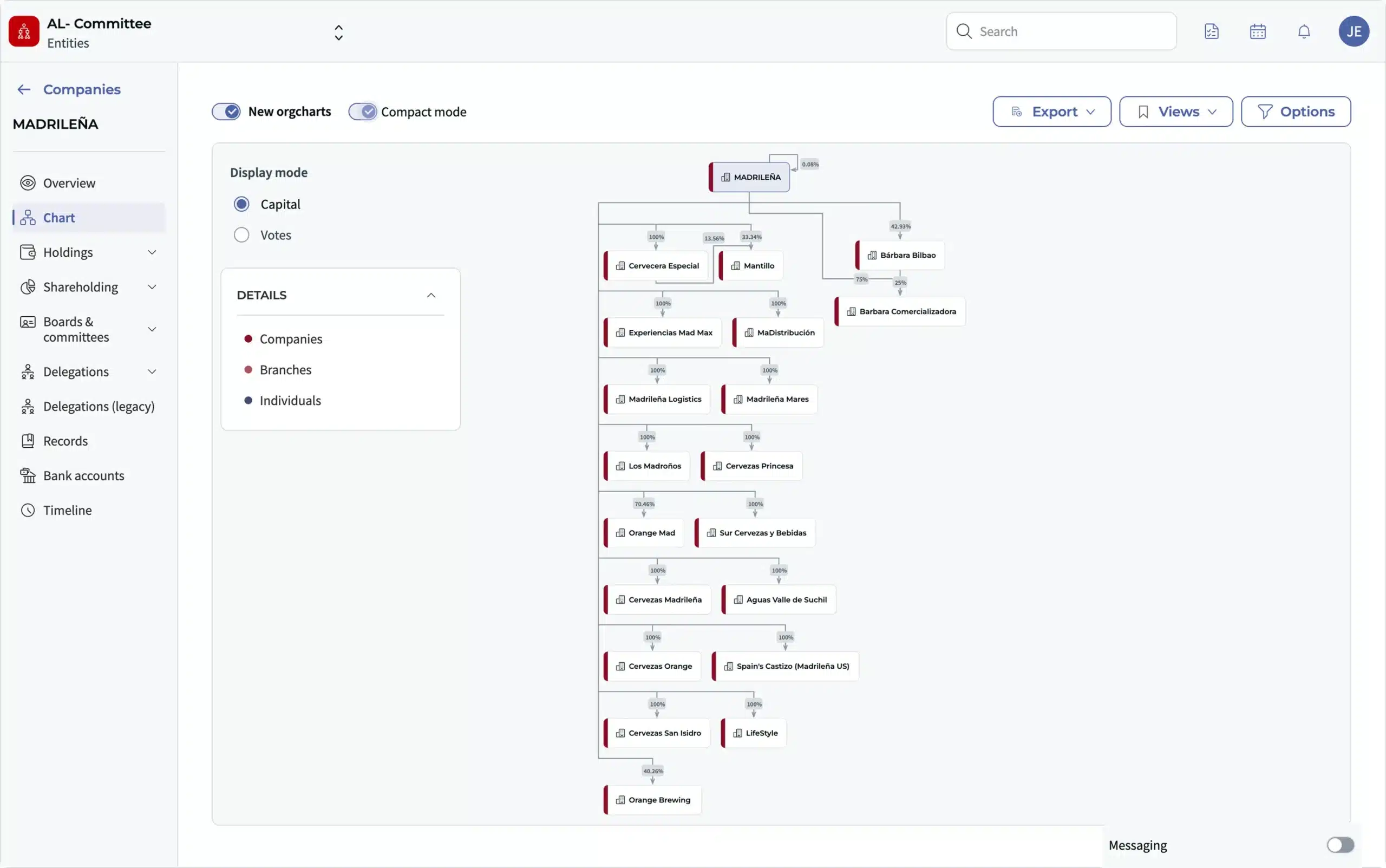
You can build and update the org chart directly within the platform. Multiple customization options are available: layer filtering, color-coding by country, and export to Excel for external reporting. If your holding structure spans several jurisdictions, these filters make it practical to view one layer at a time.
Capital structure tracking runs alongside the org chart. The platform logs every change to share capital, shareholders, and holdings, creating a reliable audit trail of your group’s ownership history.
Version-controlled historical org charts are also available on demand. If you need to show how the group was structured at a specific date – for a due diligence exercise or a regulatory filing – the platform generates that view in seconds.
Delegation of Authority Tracking and Permissions
Knowing who is authorized to sign what – and at what threshold – is one of the more operationally complex problems in entity governance. The module addresses this with a dedicated delegation of authority feature that maps all authorizations across the group in a single interface.
Each power is documented individually. You specify the scope, the authorized person, and any revocations or amendments over time. The display is fully configurable, so you can filter by entity, by individual, or by type of authority.
Generating reports on delegated powers is straightforward. The platform produces a complete list of everyone with spending authority across all group entities and exports it to Excel in a single click. This is particularly useful when preparing for audits or onboarding new signatories.
Historical authorization records are preserved with the same logic as the rest of the module. If you need to verify who held signing authority 18 months ago, the system retrieves that information without manual reconstruction. Seconds, not hours.
Document Management and Access Control by Entity
Every entity in your group has its own document folder structure within the platform. Corporate secretaries can organize subfolders by entity, document type, or workflow stage, and that structure is maintained consistently across the group.
Document permissions are set at the folder and document level. You define exactly who can view, print, or download a given document, and apply watermarks for additional security. These settings apply to both individual users and user groups, giving you granular control without IT involvement.
Configuration is precise. A corporate secretary can create a “Confidential Documents” folder accessible only to the legal team, while making standard corporate records available to finance or compliance colleagues. Access rights can be adjusted at any time, with every change tracked.
This structure means you always know where documents are and who can access them. That matters during audits, regulatory reviews, and M&A processes where document control is under scrutiny.
Compliance Reporting and Historical Data Access
The module generates corporate reports tied to specific dates: not just the current state of an entity, but its state at any point in the past. This is what makes compliance reporting practical rather than time-consuming when regulators or auditors come calling.
Every field in the platform that carries historical data is flagged with a clock icon. Click it, and you see the full change history for that field. For legal teams preparing for an external audit or responding to a regulator’s inquiry, this replaces what would otherwise involve hours of data reconstruction across emails, spreadsheets, and physical records.
A concrete example: if an external auditor requests the board composition and signatory list for a subsidiary as of 18 months ago, the module retrieves that information in seconds: structured, timestamped, and exportable. No spreadsheet archaeology, no calls to external service providers, no dependency on institutional memory.
How These Features Work Together in DiliTrust
The five features above – entity profiles, org chart builder, delegation of authority tracking, document management, and compliance reporting – cover the full operational scope of managing a corporate group. Together, they replace the combination of spreadsheets, shared drives, and manual tracking that most legal teams still depend on today.
Managing legal entity management obligations across a multi-entity group means coordinating data that changes constantly: ownership stakes shift, mandates expire, signatories change, and new subsidiaries are added. The module keeps that data current, connected, and auditable, without requiring your team to maintain it manually.
For teams with broader corporate entity compliance responsibilities, this level of structure becomes particularly critical when operating across jurisdictions with different filing deadlines, governance requirements, and regulatory expectations.
If you’re evaluating entity management software or already using the DiliTrust platform, a live demo lets you explore all five features using real scenarios from your own portfolio. During the demo, you can see how the module handles your entity structure, your authorization model, and your document workflows. Not a generic walkthrough.
See these features in action on your own data.
Ready to simplify legal entity management?
Discover how to centralize your entity data, monitor mandates automatically, generate ownership charts, and maintain full control over compliance and corporate structure.