


Attorneys lose up to two hours daily to task switching alone, according to American Bar Association experts. The culprit isn’t inefficiency; it’s fragmentation. Email chains become the system of record for case status. Spreadsheets substitute for deadline management. Documents, tasks, and budgets live in disconnected tools that don’t talk to each other.
Legal project management software eliminates that friction. It organizes legal work around matters, not inboxes. It flags deadlines before they become critical. It replaces ad hoc processes with structured, auditable workflows that scale across teams.
What Is Legal Project Management Software?
Legal project management software is a platform that helps legal teams plan, track, and manage legal work, from individual matters and contracts to team workflows and deadlines, within a structured, often cloud-based environment.
Unlike generic project management tools like Asana or Trello, legal project management software is built around the way legal work actually happens:
Legal project management is also a professional discipline rooted in the American Bar Association’s LPM frameworks. It applies structured methodologies to legal service delivery. This includes scoping, budgeting, resource allocation, risk management, and client communication, all aimed at making legal work more predictable, transparent, and cost-effective.
Legal Project Management vs. Case Management vs. Matter Management
The terminology varies, but the distinctions matter:
Legal project management refers to applying project management principles (scope, schedule, budget, risk) to legal work. It’s the methodology.
Case management usually refers to law firm software focused on litigation, tracking court dates, pleadings, discovery, and client communications. It’s litigation-centric.
Matter management is broader. A matter is any legal workstream: a contract negotiation, a regulatory inquiry, an employment investigation, M&A due diligence, or litigation. Matter management platforms organize all these types of work in a single system, often including intake, assignment, budget tracking, document storage, and reporting.
In-house legal departments typically use the term “matter management.” Law firms often use “case management” (for litigation) and “practice management” (for firm-wide operations, including billing and client intake).
The tools reviewed in this guide span both audiences but prioritize platforms that support the full matter lifecycle, not just docket management.
Law Firms vs. In-House Legal Departments: Different Tools for Different Needs
Law firms and in-house legal departments have overlapping needs, but their workflows and priorities diverge enough that many tools serve one audience better than the other.
| ASPECT | LAW FIRMS PRIORITIZE | IN-HOUSE LEGAL DEPARTMENTS PRIORITIZE |
|---|---|---|
| Core Objective | Managing client matters efficiently and maximizing billable work. | Managing legal demand from the business while controlling risk and costs. |
| Time & Billing | Detailed time tracking, billing by hour/matter/client, invoicing, trust accounting. | Budget tracking, spend management, and forecasting. |
| Intake Processes | Client intake, conflict checks, onboarding new clients. | Request intake and triage from internal business units. |
| Matter Handling | Multi-matter management for multiple clients. | Centralized oversight of all legal matters across departments. |
| Collaboration | Client communication and secure document sharing. | Cross-functional collaboration with HR, finance, procurement, and compliance teams. |
| Workflow Focus | Case progression, deadlines, and legal service delivery. | Workflow automation for repetitive legal requests (e.g., NDAs, employment matters, regulatory filings). |
| External Relationships | Maintaining client relationships and service transparency. | Managing outside counsel and controlling external legal spend. |
| Technology Integrations | Legal research platforms such as Westlaw and LexisNexis. | Enterprise systems such as Microsoft 365, Slack, and NetSuite. |
| Client/User Portals | Client portals for status updates and document exchange. | Internal self-service portals and request tracking for employees. |
| Reporting & Analytics | Revenue, utilization, realization, and matter profitability. | Legal operations reporting, KPIs, compliance, and risk visibility. |
Why Legal Teams Can’t Rely on Generic Project Management Tools
Generic tools solve generic problems. Legal work isn’t generic.
Here’s what breaks when legal teams use mass-market project management software:
- No matter taxonomy: Generic tools organize work around “projects” and “tasks.” Legal work organizes around matters, clients, jurisdictions, and matter types (litigation, transactional, regulatory, advisory). You can force-fit a matter into a Trello board, but you lose the structure that makes legal work manageable at scale.
- No legal intake: Business units need a formal, auditable way to request legal services. Generic tools offer form builders, but they don’t route requests to the right attorney, apply triage logic, or generate a structured matter record.
- No time tracking or billing: Law firms depend on the billable hour. In-house teams increasingly track time for internal cost allocation. Generic tools don’t track time natively, and third-party time-tracking integrations introduce double entry and version control issues.
- No privilege protection: Legal conversations are privileged. Sharing privileged material in a tool not designed for legal work creates inadvertent waiver risks. Legal platforms apply role-based access controls, audit trails, and encryption by design.
- No legal-specific integrations: Legal teams work in Outlook, iManage, NetDocuments, and legal research platforms. Generic tools integrate with Slack and Google Drive; they don’t integrate with the document management systems or e-billing platforms legal teams actually use.
Must-Have Features of Legal Project Management Software
Not all legal project management platforms are created equal. The best tools share a common feature set tailored to the realities of legal work.
Matter and Case Management
Every tool should provide a centralized repository for matters. At minimum, this means:
In-house teams often need a matter request intake process: a structured way for business units to submit legal requests that automatically generate matter records.
Task Management and Workflow Automation
Legal work is deadline-driven. Missing a statute of limitations or a filing deadline can end a case have serious consequences for a matter.
Therefore, look for:
The best tools let you build reusable workflows. For example, a standard NDA review workflow might include: intake → assign to attorney → draft → business unit review → revisions → approval → signature → filing.
Time Tracking and Billing Integration
For law firms, time tracking and billing are non-negotiable. For in-house teams, time tracking supports internal cost allocation, outside counsel management, and workload analysis.
Key features:
Document Management and Collaboration
Legal work generates documents: pleadings, contracts, memos, correspondence, discovery, and expert reports. Managing these documents securely and efficiently is core to legal project management.
Essential features:
Many platforms also support in-platform collaboration: commenting, real-time co-editing, task assignment from within a document, and shared workspaces for cross-functional teams or external counsel.
Security and Compliance Certifications
Legal data is sensitive. Client information, litigation strategy, contract terms, and investigation findings are all confidential, and in many cases, privileged.
The platform you choose must meet enterprise security standards:
Integrations and Scalability
The best legal project management platforms integrate with these systems:
Platforms with open APIs allow for custom integrations. This matters if your organization has proprietary tools or unique workflows.
Scalability also matters. A tool that works for a 5-person legal team may not work for a 50-person department or a 500-attorney firm. Look for platforms that support unlimited users, multiple workspaces, and role-based permissions that can grow with your organization.
AI-Powered Capabilities
AI is no longer experimental in legal project management. The best platforms use AI to:
AI doesn’t replace legal judgment. It accelerates access to information and reduces administrative burden.
How DiliTrust Supports Legal Teams With Matter Management
As legal departments grow more complex, the ability to centralize, track, and manage every matter from intake to resolution becomes essential.
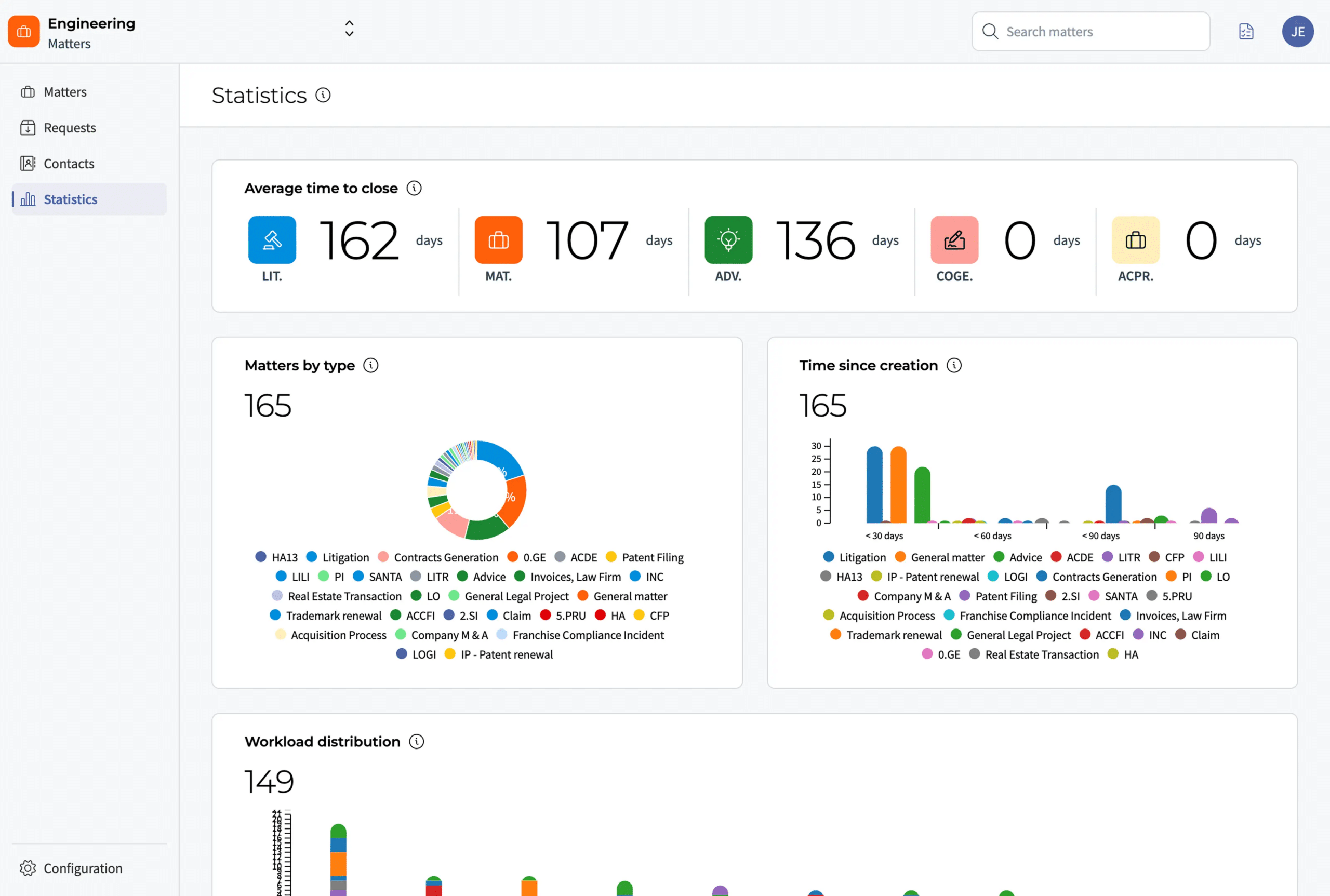
DiliTrust’s Matter Management module, part of the DiliTrust Suite, provides in-house legal teams with a unified platform to manage all matters in one place, eliminating spreadsheets and email chains.
What DiliTrust Matter Management delivers:
Frequently Asked Questions About Legal Project Management Software
Is legal project management software secure enough for confidential client data?
Yes, if you choose a platform built for legal work. Look for platforms with ISO 27001 certification, SOC 2 Type II compliance, GDPR compliance (if applicable), encryption (data at rest and in transit), role-based access controls, audit trails, and data residency options.
What actually matters when choosing legal project management software?
Three things: solving your biggest pain points, integrating with existing tools, and driving team adoption. Identify your top three problems (missed deadlines, lack of visibility, manual processes). Verify the platform integrates with tools you use daily (Outlook, iManage, Teams). Ensure your team will actually use it; the best features mean nothing without adoption. Don’t compromise on security certifications (ISO 27001, SOC 2) or must-have integrations.
What is the best legal practice management software?
There is no single best legal practice management software. The right choice depends on your team’s size, workflows, and priorities. Matter management solutions like DiliTrust are built for enterprise legal departments that need centralized matter tracking, AI-powered updates, and real-time reporting. DiliTrust combines workflow automation, prebuilt templates, and executive dashboards in one ISO 27001 certified and SOC 2 Type II compliant platform, with strong Microsoft 365 integration and dedicated customer support.